

What Is Google Ads Conversion Tracking and Why It Matters
Conversion tracking measures what people do on your website after they click your ad[1]. For a coaching institute, a conversion might be an enquiry form. For a shop, it is a purchase. Without it, you only see clicks and spend.
In the industry, this is the first thing a manager checks when you take over an account. Ads with no tracking cannot be judged. Smart Bidding has nothing to learn from. It is also one of the most common faults in Google Ads mistakes to avoid.
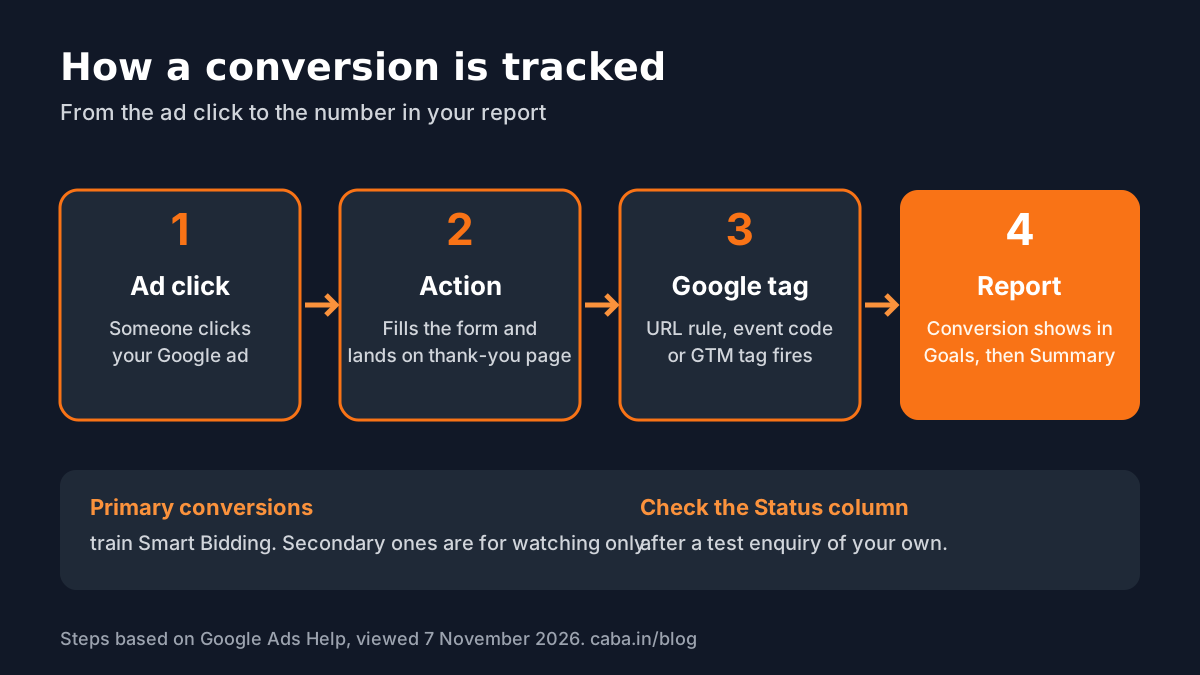
Step by Step: Set Up Your First Conversion
These steps follow Google's own help page, viewed on 7 November 2026[1]:
- 1Open Goals
In Google Ads, open the Goals menu and select Summary.
- 2Create a conversion action
Select + Create conversion action, then Edit data sources for "Conversions on a website".
- 3Scan your website
Enter your website domain and select Scan. Google checks for a Google tag or a linked Google Analytics property.
- 4Set up the Google tag
If no Google tag is found, select Set up and follow the on-screen steps, or set it up later.
- 5Pick a category
Choose the conversion category closest to the action, for example a lead form.
- 6Choose the method
Pick how to measure it: with a URL, with code, through Google Tag Manager or from GA4 events.
- 7Check the settings
Open Conversion settings to check the name, value, count, conversion windows and attribution, then save.
URL, Code, Google Tag Manager or GA4: Which Method?
| Method | Best for | How it works |
|---|---|---|
| URL (no code) | Form thank-you pages, booking confirmations | URL is, URL contains or URL starts with a page you enter |
| Code (event snippet) | Button clicks, phone link clicks, purchase values | You add an event snippet to the page |
| Google Tag Manager | Sites already using GTM | Google Ads adds suggested conversion tags to your GTM workspace; you set triggers and publish |
| Import from GA4 | Sites that already track key events in GA4 | Pick existing key events and use them as conversions |
For Google Tag Manager, Google's flow is: open the Use Google Tag Manager tab, select Set up in Google Tag Manager, choose your container, review the suggested Google Ads Conversion Tracking Tag, add it to a workspace, set the trigger and publish[1].
To import from GA4, you need Admin access in Google Ads, Edit access in the linked GA4 property and the event marked as a key event. New links or key events can take 24 to 48 hours to appear[1]. Our guide on how to set up key events in GA4 covers that side.
Primary or Secondary: The Setting Beginners Get Wrong
Each conversion action is either Primary, which Smart Bidding uses to optimise, or Secondary, which is only for watching. Google warns that getting this wrong can stop Smart Bidding from optimising well[1].
- Primary: the action that makes money, such as a submitted enquiry form.
- Secondary: helpful signals, such as a brochure download or a scroll to the fees section.
- Avoid double counting: do not track the same form with two Primary actions.
Conversion Tracking Not Working? Check These
- Open Goals, then Summary, find the action in the Name column and read its Status column[1].
- Submit a test enquiry yourself and note the time.
- Make sure the thank-you URL in the setup matches the real page exactly.
- Check that the tag is not added twice, for example by a website plugin and by GTM.
- In GTM, confirm the trigger fires and that the container version is published.
- Give new tags time; data does not appear instantly.

AI and Agentic AI in Conversion Tracking
Google's Ads Advisor and Analytics Advisor, agents built on Gemini models, began rolling out to English-language accounts in December 2025[2]. In Google Ads you can ask Ads Advisor why a campaign dropped and it suggests fixes; with your approval it can apply some changes. Smart Bidding itself is AI that learns from your Primary conversions.
What the human still decides: which action really counts as a lead, whether the numbers match your real enquiries and whether a suggested change fits the business. An AI agent cannot know that half your form fills are spam. CABA's courses now teach AI and agentic AI workflows inside the curriculum, with a human check on every change.
Portfolio Projects and Why 1-to-1 Training Helps
- Project 1: set up a thank-you page conversion for a practice website and prove it records a test lead.
- Project 2: track a WhatsApp or phone button click through Google Tag Manager.
- Project 3: import a GA4 key event and write a one-page report comparing Google Ads and GA4 numbers.
Worked example for Project 1: a test enquiry on 7 November at 3:10 pm should show in the Status column and in conversion reports after the delay Google notes. Screenshot each step for your portfolio.
Tracking is fiddly the first time. In 1-to-1 training a trainer sits with you on a live account, so mistakes are caught before they cost money. Our digital marketing course covers Google Ads, GA4, Google Tag Manager and AI tools; see also our Google Ads course guide. For pay as you grow, read digital marketing fresher salary in India. If you are still in school, read digital marketing course after 12th. Visit the digital marketing course page for the full plan.
Frequently Asked Questions
How do I set up Google Ads conversion tracking?
Open Goals, then Summary, select Create conversion action, add your website and let Google scan for a tag. Then define the conversion with a URL, code, Google Tag Manager or a GA4 key event. Then check its Status afterwards.
Can I set up Google Ads conversion tracking without code?
Yes. The URL method counts visits to a page such as a thank-you page, using URL is, URL contains or URL starts with, with no code changes once the Google tag is installed.
How do I track Google Ads conversions with Google Tag Manager?
Use the Google Tag Manager tab in the conversion setup, select Set up in Google Tag Manager, choose your container, add the suggested conversion tag to a workspace, set the trigger and publish.
Why is my Google Ads conversion tracking not working?
Common causes are a wrong thank-you URL, a tag added twice, a GTM trigger that does not fire or an unpublished container. Check the Status column under Goals, then Summary.
Can I import GA4 conversions into Google Ads?
Yes, if the event is marked as a key event in GA4, the accounts are linked and you have Admin access in Google Ads and Edit access in GA4.