
What Are Key Events in GA4?
GA4 records many events: page views, scrolls, clicks and form starts. Most are just activity. A few are the reason the website exists, such as an admission enquiry, a call button tap or a purchase. Google Analytics calls those important ones key events[1].
Google also explains the naming. A key event measures an action that matters to your business in Analytics. A conversion now means an action you use to measure and improve ad campaigns in Google Ads. The flow is simple: event, then key event, then conversion[2].
| Term | What it means | Where you use it |
|---|---|---|
| Event | Any action GA4 records | All GA4 reports |
| Key event | An event you mark as important | GA4 reports on traffic and journeys |
| Conversion | A key event used for ads | Google Ads bidding and reports |
New to GA4 reports? Start with GA4 reports for beginners, then come back here.
How to Set Up a Key Event in GA4, Step by Step
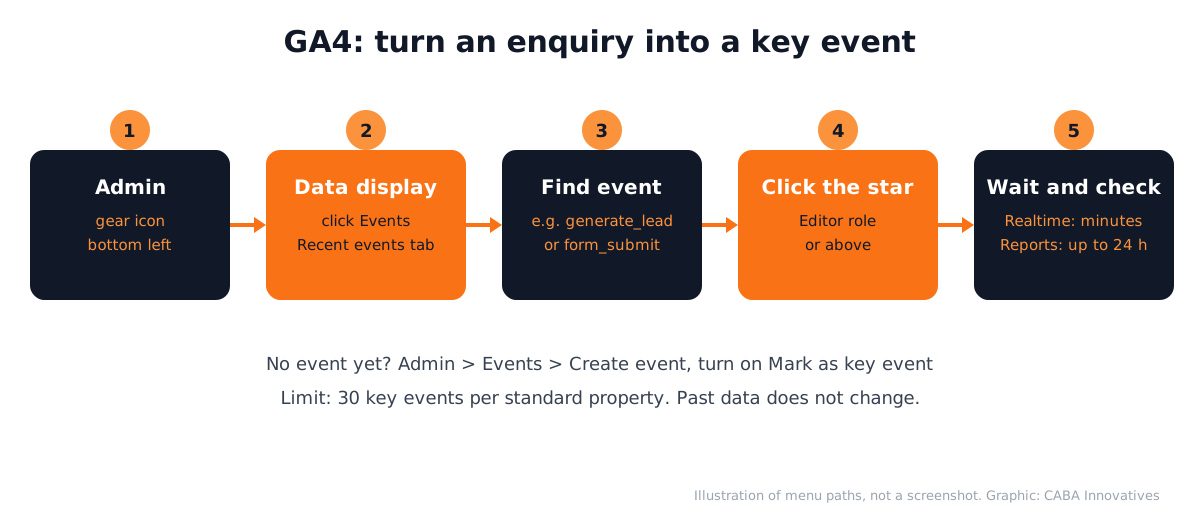
Checked on Google Analytics Help on 28 October 2026[1]:
- 1Open Admin
Click the gear icon at the bottom left of GA4.
- 2Go to Data display, then Events
Open the Recent events tab, or search for the event name.
- 3Click the star
Click the star next to the event, for example form_submit. You need Editor access or above.
- 4No event yet? Create one
Click Create event, enter a name, turn on Mark as key event, choose a default value and a counting method, then click Create. This needs Marketer access or above.
- 5Check it works
Fill in your own form. Realtime shows the key event within minutes; standard reports can take up to 24 hours.
Limits and Things That Surprise Beginners
- 30 key events per standard property (50 on Analytics 360).
- No back-filling. Marking an event as key only counts from that moment; past data does not change.
- Purchase is marked by default for web and app properties.
- Turning one off does not delete what was already collected.
- Names matter. Google lists recommended event names such as generate_lead; using them keeps reports clean[4].
Keep the list short. A coaching centre might need only three: enquiry form submitted, WhatsApp button tapped and call button tapped.
Why Key Events Matter in a Digital Marketing Job
Every client asks the same question: what did my money bring in? Without key events, you can only show clicks and visits. With them, you can show enquiries by channel, by campaign and by page. That is how agencies keep clients and how in-house marketers get budgets approved.
Job posts reflect this. On 28 October 2026, Internshala listed 68 jobs asking for Google Analytics skills[5], including fresher SEO executive and junior web analytics roles. If you run ads, tracking is the first thing to fix; see Google Ads mistakes to avoid.

Worked Example: Tracking Enquiries for a Coaching Centre
Say a coaching centre in Mukherjee Nagar runs Google Ads and Instagram posts (a hypothetical example). The owner wants to know which one brings real enquiries.
- 1List the actions
Enquiry form, WhatsApp tap and call tap. Nothing else.
- 2Check the events
form_submit comes from enhanced measurement. WhatsApp and call taps are set up as events with Tag Manager.
- 3Mark them as key events
Star all three in Admin, Data display, Events.
- 4Link Google Ads
With a linked account, create Google Ads conversions from these key events so bidding learns from real enquiries.
- 5Read the result monthly
In Reports, compare key events by session source. Use Search Console for beginners for the organic side.
3 Portfolio Projects Using GA4 Key Events
- Local business tracking plan: pick a real shop website, list its 3 key actions and write a one-page plan with event names.
- Before and after report: on your own blog or portfolio site, set up key events and show one month of enquiries by source.
- Ads plus Analytics case: run a small test campaign, mark the lead event as key and show cost per enquiry. Our performance marketing course guide explains this work.
AI and Agentic AI in Analytics Work Today
Google has added AI helpers inside Analytics and Ads that suggest insights and changes. Marketers also use AI chat tools to write tracking plans and explain odd numbers. These save time, but they can only read what you track.
What the human still decides: which actions count as real business results, whether a spike is a bug or a real lead and whether a suggested change fits the budget. CABA's courses now teach AI and agentic AI workflows inside the curriculum, with a human check on every output.
Why 1-to-1 Training Helps With GA4
GA4 menus change often and every website is set up differently. In a 1-to-1 session, a trainer looks at your own property, finds why a form is not tracking and shows the fix on your screen. Group videos cannot do that.
Our digital marketing course in Delhi covers GA4, Tag Manager, Search Console, Google Ads and Meta Ads with live campaigns and a portfolio. Wondering if a full course is right for you? Read is a digital marketing course worth it. The course comes with a 100% Job Guarantee; read the job guarantee terms, then see batches on the digital marketing course page.
Frequently Asked Questions
What are key events in GA4?
Key events are GA4 events you mark as important to your business, such as a form submit, a call tap or a purchase. They appear in reports so you can see which traffic brings real results.
How do I mark an event as a key event in GA4?
Go to Admin, then Data display, then Events. Find the event in Recent events and click the star. You need Editor access or above.
What is the difference between key events and conversions?
Key events are important actions measured in Google Analytics. Conversions are key events used to measure and improve Google Ads campaigns through a linked account.
How many key events can I create in GA4?
Up to 30 key events in a standard property and 50 in an Analytics 360 property.
Why is my new key event not showing in reports?
Standard reports can take up to 24 hours. Check Realtime first by triggering the event yourself. Marking an event as key does not change past data.
References
- Mark events as key events- Google Analytics Help
- Conversions vs. key events in Google Analytics- Google Analytics Help
- Enhanced measurement events- Google Analytics Help
- Recommended events- Google Analytics Help
- Google Analytics Jobs (listings viewed 28 October 2026)- Internshala