What Is Google Keyword Planner Used For?
Google describes Keyword Planner as a tool to discover new keywords, view estimates of monthly searches, see the average cost for ads and organise keywords into a plan[1]. Digital marketers use it for two jobs:
- Google Ads. Choosing keywords for Search campaigns and estimating clicks and cost before spending.
- SEO and content. Finding the questions and phrases people search, so blog posts and pages match real demand.
If you have never run a campaign, read Google Ads mistakes to avoid alongside this guide.
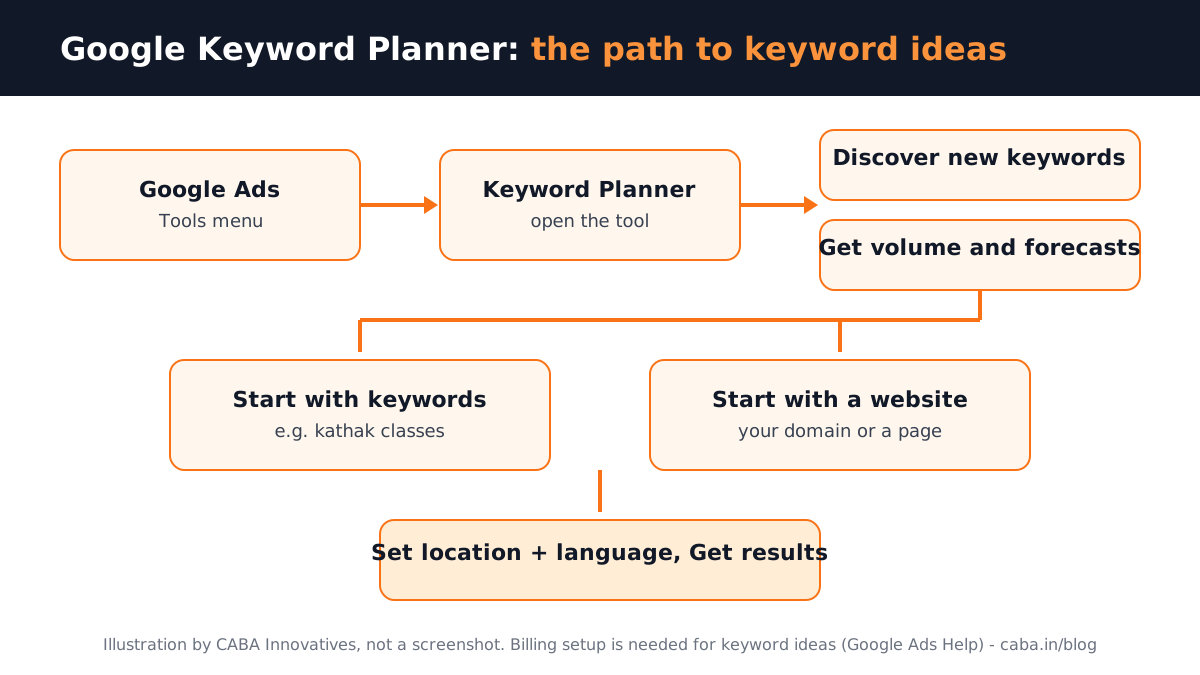
How to Open Keyword Planner Step by Step
- 1Sign in to Google Ads
Use the business's Google Ads account. Google's help says you must complete account setup, including billing information, to use "Get ideas for new keywords"[1].
- 2Open the Tools menu
Go to Keyword Planner within the Tools menu.
- 3Choose how to start
Discover new keywords (for ideas) or Get search volume and forecasts (to check a list you already have).
- 4Start with keywords or a website
Type a few words such as "dance classes, kathak classes" or enter a website. Google notes that a keyword plus a URL usually gives more ideas than a URL alone.
- 5Set location and language
Check the location (India, Delhi or a radius) and language at the top of the results before you read numbers.
- 6Select Get results
You get a list of keyword ideas you can filter, group and add to a plan.
How to Read Keyword Planner Numbers
| Column | What it tells you | How to use it |
|---|---|---|
| Average monthly searches | Roughly how often people search the phrase | Compare keywords; do not treat it as an exact count |
| Competition | How many advertisers bid on it | High competition usually means higher cost for ads |
| Top-of-page bid (low and high range) | What advertisers have paid to show at the top | Plan your ads budget |
Two cautions from Google's own help. Keywords with very low volume or in sensitive categories may not show any data. Forecasts are refreshed daily from the last 7 to 10 days (adjusted for season). Actual performance depends on your bid, budget, ad quality, location and customer behaviour[1].
How to Use Google Keyword Planner for SEO
For SEO, volume is only half the story. A smaller keyword that matches what a buyer wants often brings more enquiries than a big general one.
- Group by intent. "Kathak classes near me" is a buyer; "what is kathak" is a reader. Give each its own page or article.
- Check Search Console next. Compare Planner ideas with the queries your site already appears for in Google Search Console.
- Look at the results page. Search the keyword yourself and see what kind of pages rank before you write.
- Measure after publishing. Track visits and enquiries in GA4 reports.
Keyword Planner shows Google Search data. YouTube searches behave differently, so for video topics use YouTube's own search suggestions as well. Making thumbnails for those videos? See YouTube thumbnail design.

Worked Example: Keywords for a Dance Academy in Rohini
Say a dance academy in Rohini wants more admissions. The marketer starts with "dance classes, kathak classes, bollywood dance classes", sets the location to Delhi and gets results. A sensible plan:
| Keyword type | Example | Where it goes |
|---|---|---|
| Local buyer | dance classes in rohini | Google Ads Search campaign + Google Business Profile |
| Style buyer | kathak classes for kids | A landing page on the website |
| Question | best age to start kathak | A blog article |
| Not useful | free dance classes online | Added as a negative keyword |
The academy's name and numbers here are only an example. The process is what matters: ideas, filter, group by intent, then decide ads or SEO for each group.
Beginner Mistakes in Keyword Planner
- Reading numbers for the wrong location (the whole world instead of India or Delhi).
- Choosing only the biggest keywords and ignoring intent.
- Treating forecasts as promises; Google says they are estimates.
- Skipping negative keywords, so ads show for job seekers or free searches.
- Adding hundreds of keywords to one ad group instead of small themed groups.
Do Digital Marketing Jobs Ask for Keyword Research?
Yes, often by name. From Internshala's Delhi NCR listings viewed on 23 October 2026, in our own words (company names left out)[2][3]:
- SEO associate, Delhi NCR (0 to 1 year). On-page, off-page and technical SEO. Skills listed include Google Analytics, SEM and Google AdWords. Pay shown: ₹2.5 to 3.5 lakh a year.
- SEO, social media and content internship, Ghaziabad (6 months). Keyword research, SEO tasks and website updates. Stipend shown: ₹10,000 to 12,000 a month.
- Digital marketing associate, Noida (1 year). Plan and deliver digital campaigns. Skills listed include SEM, SEO and Facebook marketing. Pay shown: ₹2.5 to 5 lakh a year.
Digital marketing pay grows with results. Our students typically start at ₹18,000 to ₹25,000 a month, reach ₹30,000 to ₹35,000 after six months, ₹45,000 to ₹55,000 at two years and ₹60,000 to ₹65,000 at three years. See performance marketing course for how keyword work fits into paid campaigns.
AI and Agentic AI in Keyword Research Today
Marketers now use ChatGPT, Claude or Gemini to brainstorm seed words and group long keyword lists by intent. Inside Google Ads, Google has introduced Ads Advisor, an agentic helper for account tasks. Google advises reviewing its suggestions before acting. What the human still decides: which keywords match the business, what to exclude, the budget and whether the numbers make sense for the city. CABA's courses now teach AI and agentic AI workflows inside the curriculum, with a human check on every output.
Why 1-to-1 Training Helps Here
Keyword Planner gives everyone the same numbers. The skill is in deciding what to do with them. In a 1-to-1 class you research keywords for a real business, build the plan and see how it performs in a live campaign, with a trainer checking every choice.
Our digital marketing course in Delhi covers SEO, Google Ads, Meta ads, GA4, content and AI tools, with live campaign practice. It comes with a 100% Job Guarantee; read the job guarantee terms. See the semester plan on the digital marketing course page.
Frequently Asked Questions
How do I use Google Keyword Planner for keyword research?
Open Google Ads, go to Keyword Planner in the Tools menu, choose Discover new keywords, enter words or a website, set the location and language and select Get results. Filter the ideas and save useful ones to a plan.
Can I use Google Keyword Planner without creating an ad?
Google's help says you need to complete account setup, including billing information, to use keyword ideas. It does not say you must keep ads running; research and running campaigns are separate steps.
Is Google Keyword Planner good for SEO?
Yes, for finding phrases and comparing demand. Combine it with Search Console data and look at what already ranks before writing.
Does Keyword Planner show YouTube search volume?
Keyword Planner shows Google Search data. YouTube searches behave differently, so use YouTube's own search suggestions for video topics.
Why are some keywords missing in Keyword Planner?
Google says keywords with very low search volume or in sensitive categories may not be discoverable or forecastable.