Why Does Noise Reduction Matter for Video Editors?
Viewers will forgive a slightly soft picture. They scroll away from a voice buried under fan noise. Most videos our students edit are shot in homes, offices and shops, so the hum of a ceiling fan or an AC is almost always there.
Studios and YouTube teams expect a fresher to clean dialogue without being told. Knowing Audition, Adobe's audio editor, is what turns "I can edit" into "I can deliver a finished video". If you shoot on a phone, our guide to shooting on a phone and editing on a laptop explains the rest of that workflow.
Which Audition Noise Reduction Effect Should You Use?
| Problem | Effect | Where it works |
|---|---|---|
| Steady hum or hiss (fan, AC, laptop fan, power-line hum) | Noise Reduction (with a noise print) | Waveform Editor only, applied to the file |
| Changing noise (wind, rumble, traffic) | Adaptive Noise Reduction | Real time, Effects Rack, also in Multitrack |
| One specific sound (siren, phone ring) | Sound Remover | Learns the sound, then removes it |
| Clicks and pops | Automatic Click Remover | Real time, Effects Rack |
All of these sit under Effects > Noise Reduction/Restoration. The facts and menu paths here come from Adobe's Audition help page, checked on 15 October 2026[1].
How to Use Noise Reduction in Adobe Audition, Step by Step
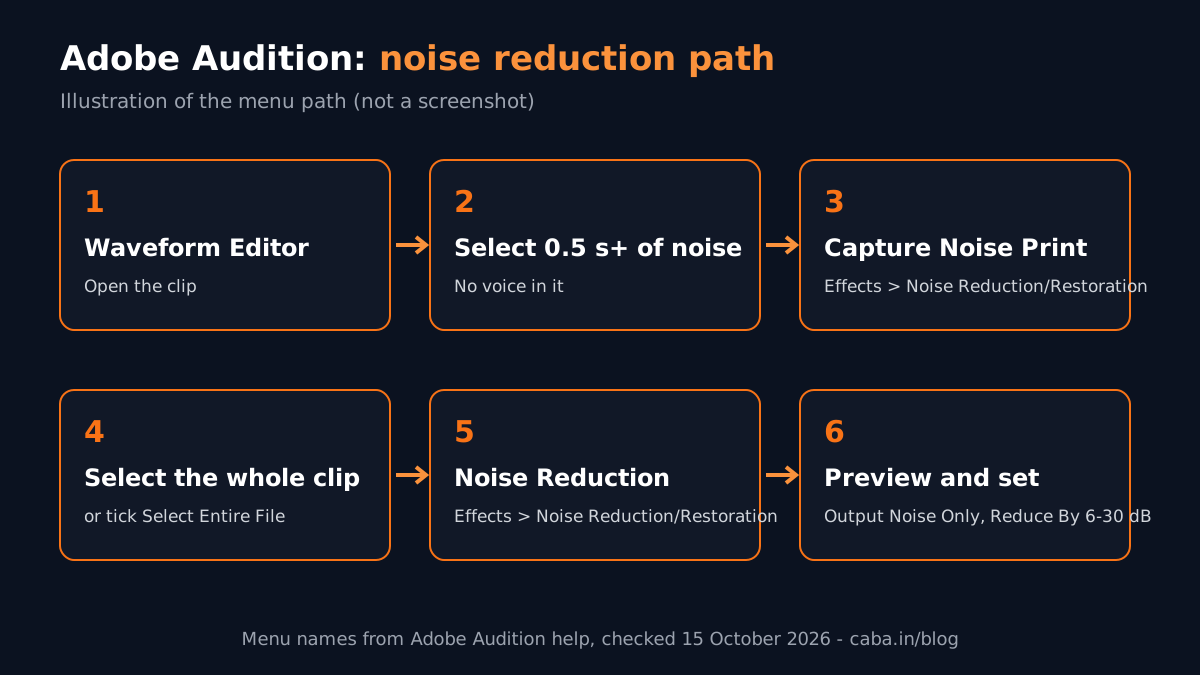
- 1Open the clip in the Waveform Editor
Noise Reduction only works there, because it changes the file itself. Work on a copy if the recording matters.
- 2Select pure noise
Find a gap where nobody speaks and select at least half a second of it. If the selection is too short, Capture Noise Print stays greyed out.
- 3Capture the noise print
Effects > Noise Reduction/Restoration > Capture Noise Print. Audition now knows what your noise sounds like.
- 4Select the part to clean
Select the whole clip (or tick Select Entire File in the effect window).
- 5Open Noise Reduction
Effects > Noise Reduction/Restoration > Noise Reduction.
- 6Preview what you are removing
Tick Output Noise Only and play. If you hear words in it, you are removing voice too. Pull the settings back.
- 7Set the amount
Start with Reduce By around 10 to 12 dB and raise it slowly. Adobe says 6 to 30 dB works well. Stop when the voice starts to sound watery.
- 8Apply and listen on headphones
Check the loud parts and the quiet parts. Then save or send the clip back.
Which Noise Reduction Settings Matter Most?
| Setting | What it does | Safe starting point (from Adobe's help) |
|---|---|---|
| Reduce By | How far the detected noise is pushed down | 6 to 30 dB; lower values reduce bubbly sounds |
| Noise Reduction (%) | How much of the noise is removed | Raise slowly while previewing |
| Spectral Decay Rate | How processing fades when audio falls below the noise floor | 40% to 75% |
| FFT Size | How many frequency bands are analysed | 4096 to 8192 |
| Output Noise Only | Lets you hear only what will be removed | Use it every time |
Two more tips from Adobe's page. First, remove any DC offset before you start (Favorites > Repair DC Offset), or the effect may add clicks in quiet parts. Second, a realistic goal is to improve the voice-to-noise gap by 5 to 20 dB while keeping good quality. Chasing total silence is what ruins voices.
When Should You Use Adaptive Noise Reduction or Sound Remover?
Outdoor interviews have noise that keeps changing: wind, a passing bike, people talking. A single noise print cannot capture that. Adaptive Noise Reduction studies the first few seconds and keeps adjusting, so start your selection with a bit of noise before the voice. It runs in real time, so you can stack it in the Effects Rack and use it in the Multitrack Editor. If your computer slows down, lower the FFT Size and turn off High Quality Mode.
Sound Remover is for one repeated sound you can isolate, such as a siren or a phone ringtone. Select only that sound, click Learn Sound Model and tick Enhance for Speech so the voice is protected.

How Do You Send Audio From Premiere Pro to Audition?
Most editors cut in Premiere Pro and clean sound in Audition. In Premiere, select the audio clip and choose Edit > Edit in Adobe Audition > Clip. Premiere makes a copy, opens it in Audition and links it back, so your cleaned audio appears on the timeline when you save[2]. For a whole mix, use Edit > Edit in Adobe Audition > Sequence.
Slow timeline while you do this? Our tips to make Premiere Pro faster help on most laptops.
AI and Agentic AI in Audio Clean-Up
Premiere Pro now has Enhance Speech in the Essential Sound panel. It uses AI to cut background noise and improve clarity in one click. A Mix Amount slider lets you blend the result with the original[3]. Adobe has also added an AI assistant to Premiere (public beta) that can run multi-step edits from a plain request. Many editors run Enhance Speech first and then fix what is left in Audition.
AI can over-clean. It can make a voice sound flat or robotic, or cut breaths that made the speaker sound human. The editor still listens on headphones, decides how clean is clean enough and matches the sound across clips. CABA's courses now teach AI and agentic AI workflows inside the curriculum, with the editor signing off every export.
Do Video Editing Jobs Ask for Audio Skills?
Yes. On 15 October 2026 Internshala's Delhi list of fresher motion graphics and video openings had 25 posts[4]. Two examples, in our own words (company names left out):
- Video editor for Reels and social media, Delhi and Noida. Skills listed: Premiere Pro, After Effects, audio editing, motion graphics and colour correction. Pay shown: ₹2 to 5 lakh a year.
- Video editor with camera work, Faridabad and Delhi. Handle camera setup, framing, lighting and audio, then edit. Skills listed: Premiere Pro and video editing. Pay shown: ₹3 to 4 lakh a year.
| Stage | Typical monthly salary for video editors (Delhi NCR) |
|---|---|
| Fresher (first job) | ₹12,000 to ₹15,000 |
| After 1 year | ₹18,000 to ₹22,000 |
| After 2 years | ₹30,000 to ₹35,000 |
These are the figures we see for our video editing students. Editors who also handle sound, graphics and motion grow faster than editors who only cut.
Projects to Build With Audition
- Fan-noise rescue: record a 2-minute interview under a ceiling fan, clean it and post the before and after.
- Podcast clip: two voices, one louder than the other. Clean, balance and export a 60-second clip for Reels.
- Outdoor Reel: a street interview with traffic. Use Adaptive Noise Reduction and keep the voice natural.
Worked example for the first project: record 5 seconds of fan noise before speaking. Capture the noise print from that gap. Apply Noise Reduction at Reduce By 12 dB, preview with Output Noise Only and lower it if words leak through. Export, then place the before and after side by side in your portfolio. It is a small project that shows an employer you finish videos properly.
Why Does 1-to-1 Training Help With Audio?
Audio is hard to learn from videos because you cannot hear what the tutor hears on your machine. In one-to-one training the trainer listens to your clip with you, shows you when you have over-cleaned and sets up Audition and Premiere on your own laptop. Sound editing in Audition is part of our video editing course, along with Premiere Pro, After Effects and graphics. It is also part of the motion graphics course in Delhi syllabus.
Want sound work to lead to a job? Our video editing course with placement runs in South Delhi and live online. The Premium plan carries a 100% Job Guarantee. Read the terms on the job guarantee page. New to editing? Start with video editing for beginners.
Frequently Asked Questions
How do I do noise reduction in Adobe Audition?
In the Waveform Editor, select at least half a second of pure noise, choose Effects > Noise Reduction/Restoration > Capture Noise Print, select the clip and apply Effects > Noise Reduction/Restoration > Noise Reduction. Preview with Output Noise Only and keep Reduce By between 6 and 30 dB.
What are the best Adobe Audition noise reduction settings?
Adobe's help suggests Reduce By of 6 to 30 dB, Spectral Decay Rate of 40% to 75% and FFT Size of 4096 to 8192. Start low and raise slowly while listening on headphones.
Why does my voice sound robotic after noise reduction?
Too much reduction. Lower Reduce By and the Noise Reduction percentage. Then check with Output Noise Only that no words are being removed.
Can I use Audition noise reduction in the Multitrack Editor?
The standard Noise Reduction effect works only in the Waveform Editor. Adaptive Noise Reduction works in real time and can be used in the Multitrack Editor and Effects Rack.
Does CABA Innovatives teach Adobe Audition?
Yes. Sound editing with Audition is part of CABA's video editing and motion graphics courses, along with Premiere Pro and After Effects, in South Delhi and live online.
References
- Reduce noise and restore audio (Audition User Guide, updated 21 January 2026)- Adobe Help Center
- Edit Premiere audio clips in Audition- Adobe Help Center
- Enhance speech in Premiere- Adobe Help Center
- Motion Graphics Fresher Jobs in Delhi (listings viewed 15 October 2026)- Internshala