Why Do Captions Matter in Video Editing Jobs?
Many people watch Reels and Shorts with the sound off, on a bus or in an office. Captions keep them watching. That is why so many editing job posts now list captions as a basic task, the same way they list cutting and colour.
Two posts we read on Internshala on 21 November 2026 say it plainly: a junior video editor role in Jaipur lists adding subtitles, captions and motion graphics to YouTube videos and Reels[1]. A fresher designer role in Delhi lists editing short videos with text, subtitles and thumbnails[2]. Clients expect captions. Speed at making them is part of your value.
How to Make Auto Captions in Premiere Pro, Step by Step
- 1Open the captions workspace
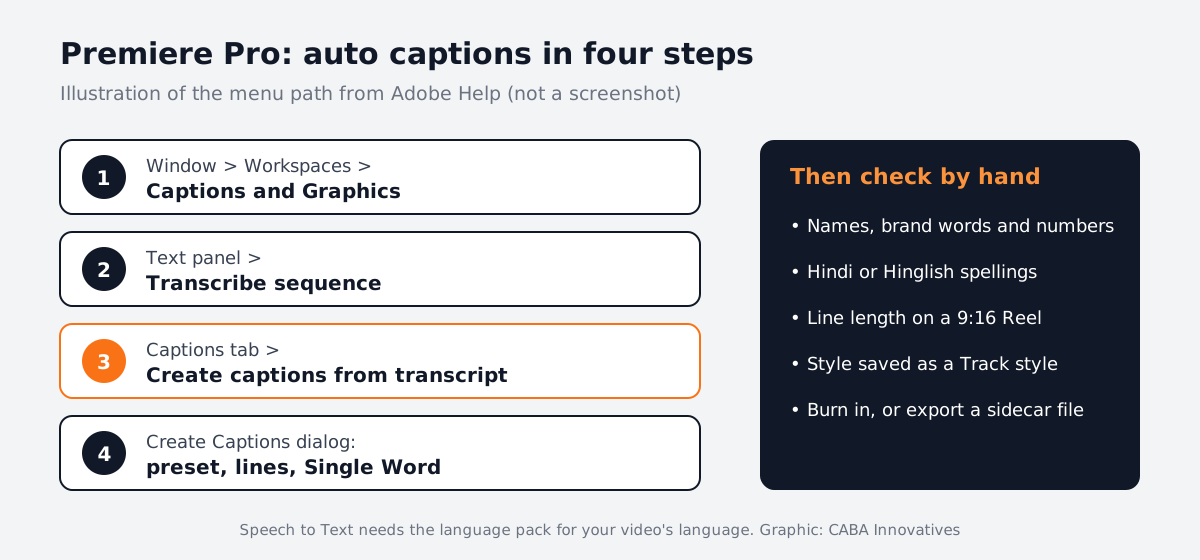
Go to Window > Workspaces > Captions and Graphics.
- 2Transcribe the sequence
In the Text panel, select Transcribe sequence and wait. Speech to Text lets you set the language, speaker labels and which audio to read. It can transcribe only between In and Out points[3].
- 3Create captions
In the Captions tab, choose Create captions from transcript.
- 4Pick the settings
In the Create Captions dialog, choose a preset (Subtitle default suits most videos), format, style, length, duration, gap and one or two lines[4].
- 5Create and check
Select Create captions. Premiere places them on a caption track in sync with the dialogue. Now play it through and correct mistakes.
Premiere Pro Auto Captions Languages and Settings That Matter
Adobe's list of Speech to Text languages includes Hindi, English and English (UK), along with many others such as Spanish, French, German and Japanese[5]. If your language does not show, download its language pack first.
| Setting | Use it for | Why |
|---|---|---|
| Two lines, longer length | YouTube talks and interviews | Fewer caption changes; easier to read long sentences |
| One line, shorter length | Reels and Shorts | Keeps text away from the app buttons at the bottom |
| Single Word layout | Fast, punchy Reels | Shows one word at a time, in sync with speech |
| Speaker labels | Podcasts and panel videos | Separates who said what in the transcript |
Single Word sits under Captioning Preferences > Layout in the Create Captions dialog[6]. For Reel sizes and export settings, see our guide to Premiere Pro settings for Instagram Reels.
Premiere Pro Captions Style: Make Them Look Designed
Default white captions work, but clients want their brand look. Select a caption on the timeline and use the Properties panel: font, fill colour, stroke, shadow and alignment. When it looks right, select the plus icon in the Track style menu and choose Create style. Save it to the project, or to Local styles so it is ready in every future project.
A popular Reels look is the highlighted word: one key word in a brand colour. With Single Word captions you can colour individual captions by hand. For animated highlights that pop or bounce, editors often move to After Effects, which is where motion graphics begins.
Premiere Pro Auto Captions Not Working? Common Fixes
- No captions button: you must transcribe the sequence first; captions are built from the transcript.
- Wrong language output: check the language setting in the transcribe dialog and download the language pack.
- Many mistakes: clean the audio first. Noise and music under speech confuse Speech to Text. Our Adobe Audition noise reduction guide helps.
- Captions missing in the exported file: in the Export workspace, burn captions in, or export a sidecar caption file, depending on what the platform needs[7].
AI and Agentic AI in Captioning Work
Speech to Text is itself an AI feature. Premiere can also translate captions. Editors also use ChatGPT or Gemini to clean a transcript's punctuation. Some teams use AI agents that caption, translate and resize one master video for every platform.
The human still checks every name, brand, price and Hinglish word, decides where a line breaks and makes sure nothing covers a face or a product. CABA's courses now teach AI and agentic AI workflows inside the curriculum, with this human check built in.
Portfolio Projects to Practise Premiere Pro Captions
- Talking-head Reel: a 30-second tip video with single-word captions in a brand colour.
- Bilingual YouTube clip: a 2-minute interview with English captions and a Hindi caption track.
- Podcast short: a 45-second clip with speaker labels and two-line captions.
Worked example for project 1: record yourself giving one study tip on your phone. Import it with Automatic Transcription on, create Single Word captions, set Montserrat Bold with a black stroke, colour the key word orange and save it as a Track style. Proofread, export at 1080 x 1920 and compare it with a Reel you like.
Want more practice ideas? See Premiere Pro tips for beginners and how to become a YouTube video editor.
Why One-to-One Training Helps With Captions
Captions look simple until a client sends a noisy Hinglish interview with three speakers. A trainer sitting beside you shows which settings to change, how to fix timing fast and how to keep a style consistent across 30 videos. That is hard to learn from a video tutorial alone.
Our video editing course covers Premiere Pro, After Effects, sound editing and AI tools one-to-one. It carries a 100% Job Guarantee; see the job guarantee page. If you want animated captions and graphics too, compare the duration of a full motion graphics course. More on the video editing course in Delhi is on the course page.
Frequently Asked Questions
How do you make Premiere Pro auto captions?
Use Window > Workspaces > Captions and Graphics, transcribe the sequence in the Text panel, then choose Create captions from transcript in the Captions tab and pick your preset, lines and length.
Does Premiere Pro auto captions support Hindi?
Yes. Adobe lists Hindi among the Speech to Text languages, along with English and many others. Download the language pack if it is not installed.
How do I get one word at a time captions in Premiere Pro?
In the Create Captions dialog, expand Captioning Preferences and set Layout to Single Word, then create the captions.
Why are my Premiere Pro auto captions not showing in the export?
Choose to burn captions into the video in the Export workspace, or export a separate caption file if the platform accepts one.
Are auto captions accurate enough for clients?
They save a lot of typing, but always proofread names, brands, numbers and Hinglish words before delivery.
References
- Fresher Junior Video Editor job in Jaipur, Internshala (seen 21 November 2026)- Internshala
- Fresher Graphic Designer job in Delhi, Internshala (seen 21 November 2026)- Internshala
- Auto transcribe video using Speech to Text (updated 2 June 2026)- Adobe Help Center
- Create captions (updated 7 January 2026)- Adobe Help Center
- Languages supported by Speech-to-Text- Adobe Help Center
- Create single word captions (updated 18 August 2026)- Adobe Help Center
- Export caption tracks (updated 7 January 2026)- Adobe Help Center