
Why Studios Expect You to Know Illustrator Shortcuts
In a design test, two candidates can make the same logo. The one who switches tools with keys instead of hunting in menus finishes in half the time and has time left for a second idea. Agencies notice that. Over a full day of logos, icons and social posts, shortcuts save hours.
Every shortcut below was checked on Adobe's official Illustrator keyboard shortcuts page on 19 November 2026[1]. Windows keys come first, Mac keys second.
Illustrator Shortcut Keys for Tools
| Tool | Windows | Mac |
|---|---|---|
| Selection | V | V |
| Direct Selection | A | A |
| Pen | P | P |
| Type | T | T |
| Rectangle | M | M |
| Ellipse | L | L |
| Shape Builder | Shift + M | Shift + M |
| Artboard | Shift + O | Shift + O |
| Eyedropper | I | I |
| Rotate | R | R |
| Scale | S | S |
| Width | Shift + W | Shift + W |
| Free Transform | E | E |
| Hand | H | H |
| Zoom | Z | Z |
Shortcuts for Selecting, Grouping and Arranging
| Action | Windows | Mac |
|---|---|---|
| Undo | Ctrl + Z | Cmd + Z |
| Redo | Shift + Ctrl + Z | Shift + Cmd + Z |
| Select all | Ctrl + A | Cmd + A |
| Deselect all | Shift + Ctrl + A | Shift + Cmd + A |
| Group | Ctrl + G | Cmd + G |
| Ungroup | Shift + Ctrl + G | Shift + Cmd + G |
| Lock selected | Ctrl + 2 | Cmd + 2 |
| Release all locked artwork | Alt + Ctrl + 2 | Option + Cmd + 2 |
| Hide selected | Ctrl + 3 | Cmd + 3 |
| Show all hidden | Alt + Ctrl + 3 | Option + Cmd + 3 |
| Bring to front | Shift + Ctrl + ] | Shift + Cmd + ] |
| Send to back | Shift + Ctrl + [ | Shift + Cmd + [ |
| Paste in place (active artboard) | Ctrl + Shift + V | Cmd + Shift + V |
| Default fill and stroke | D | D |
| Swap fill and stroke | Shift + X | Shift + X |
Shortcuts for View, Guides and Dialogs
| Action | Windows | Mac |
|---|---|---|
| Outline view | Ctrl + Y | Cmd + Y |
| Smart Guides on/off | Ctrl + U | Cmd + U |
| Show or hide rulers | Ctrl + R | Cmd + Option + R |
| Show or hide guides | Ctrl + ; | Cmd + ; |
| Fit artboard in window | Double-click Hand tool | Double-click Hand tool |
| Zoom in for a moment | Ctrl + Spacebar | Spacebar + Cmd |
| Preferences | Ctrl + K | Cmd + K |
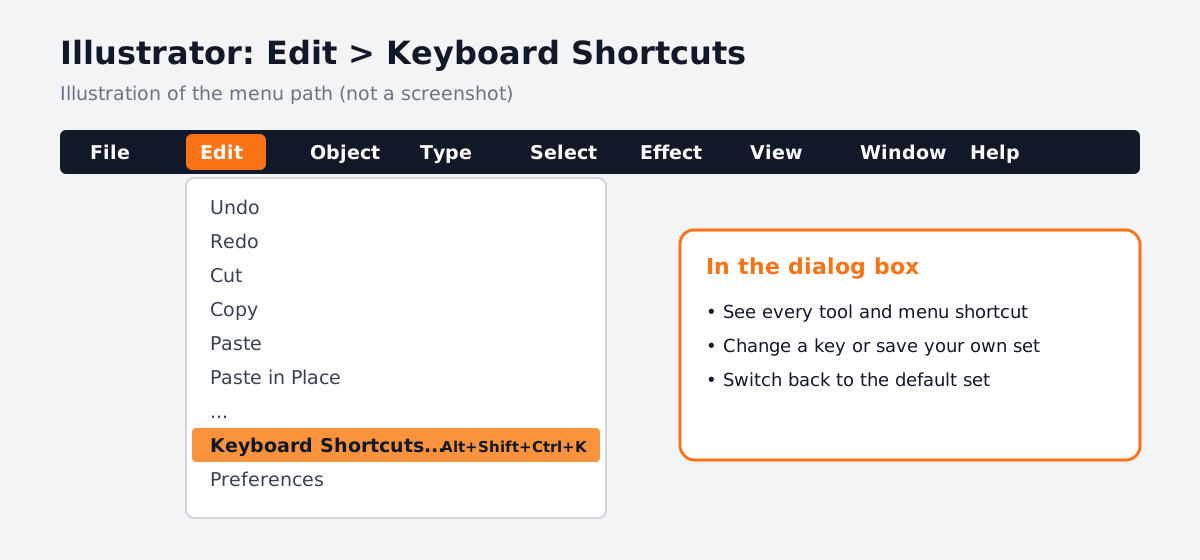
| Keyboard Shortcuts dialog | Alt + Shift + Ctrl + K | Option + Shift + Cmd + K |
| Save As | Shift + Ctrl + S | Shift + Cmd + S |
| Export for Screens | Alt + Ctrl + E | Option + Cmd + E |
Want the matching list for photo work? See our Photoshop shortcut keys guide. Many keys, such as Ctrl + Z and the Spacebar for the Hand tool, work the same way in both apps.
Illustrator Shortcuts Not Working? Check These First
- 1Are you typing inside text?
If the cursor is in a text box or a panel field, single-letter keys type letters instead of switching tools. Press Esc, then try again.
- 2Is another app using the key?
Screen recorders, chat apps and some keyboard utilities grab shortcuts first. Close them and test.
- 3Has someone changed the shortcut set?
Open Edit > Keyboard Shortcuts and check which set is active. Shared lab computers often have custom sets.
- 4Is it a Mac system shortcut?
Some Cmd + Option keys are also used by macOS. Check System Settings > Keyboard > Keyboard Shortcuts.
AI in Illustrator: Where Shortcuts Still Matter
Illustrator now has Text to Vector Graphic, which drafts scenes, subjects and icons from a written prompt, reached from the Contextual Task Bar or Object > Generative[2]. Some studios also use AI agents to prepare many sizes of one approved design.
AI gives you a first draft. The finishing is still yours: fixing points with the Direct Selection tool (A), merging shapes with Shape Builder (Shift + M), checking paths in Outline view (Ctrl/Cmd + Y) and making sure the logo is original and on-brand. CABA's courses now teach AI and agentic AI workflows inside the curriculum, with this hand-finishing step built in.
Portfolio Projects to Practise These Shortcuts
- A 12-icon set for an app or a hotel, using Shape Builder and Smart Guides.
- A logo with three versions (full colour, one colour, reversed). Our logo design in Illustrator guide walks through it.
- A print poster set up for the press, using the steps in Illustrator settings for print and screen.
Worked example, a Wi-Fi card icon for a hotel design project: press L and draw three circles of rising size, then M for a rectangle across the bottom half. Press V, select all with Ctrl + A, switch to Shape Builder with Shift + M and Alt-drag over the parts you want to delete. Press Ctrl + Y to check the paths in Outline view, Ctrl + Y again to return, then Ctrl + G to group. With keys, this takes about two minutes.

Why One-to-One Training Helps With Illustrator
Most beginners struggle with the Pen tool and with selecting the right thing in a crowded file. A trainer sitting beside you sees the exact click that goes wrong and fixes the habit on day one, instead of after months of slow work.
Our graphic design course teaches Illustrator with Photoshop, InDesign and AI tools through real briefs. The course carries a 100% Job Guarantee (see the job guarantee page). Still deciding between apps? Read CorelDRAW vs Illustrator, or see the full plan on the graphic design course in Delhi page.
Frequently Asked Questions
What are the most used Illustrator shortcut keys?
V (Selection), A (Direct Selection), P (Pen), T (Type), Shift + M (Shape Builder), Ctrl/Cmd + G (Group), Ctrl/Cmd + Y (Outline view) and Shift + X (swap fill and stroke).
How do I see all shortcut keys in Illustrator?
Open Edit > Keyboard Shortcuts, or press Alt + Shift + Ctrl + K on Windows or Option + Shift + Cmd + K on Mac.
Why are my Illustrator shortcuts not working?
Usually the cursor is inside a text box, another app is using the key or a custom shortcut set is active. Press Esc and check Edit > Keyboard Shortcuts.
Are Illustrator shortcuts different on Mac?
Mostly the same, with Command in place of Ctrl and Option in place of Alt. A few, such as rulers, use a different combination.
Is there an Illustrator shortcut keys PDF?
Adobe keeps the full list on its help page. Many designers print the tables on this page and keep them beside the keyboard for the first few weeks.
References
- Illustrator keyboard shortcuts (checked 19 November 2026)- Adobe Help Center
- Generate scenes, subjects and icons in Adobe Illustrator- Adobe Help Center