
Why Do GA4 Reports Confuse Beginners?
Open Google Analytics 4 for the first time and you see Reports, Explore, Advertising and a long left menu. Our students usually click around, see dozens of numbers and close it. The fix is to stop trying to read everything. Learn five reports well. Everything else builds on them.
One term first. An event is anything a visitor does: a page view, a scroll, a click. A key event is an event you mark as important, like an enquiry form submit or a WhatsApp click. Most of what a business cares about is in key events.
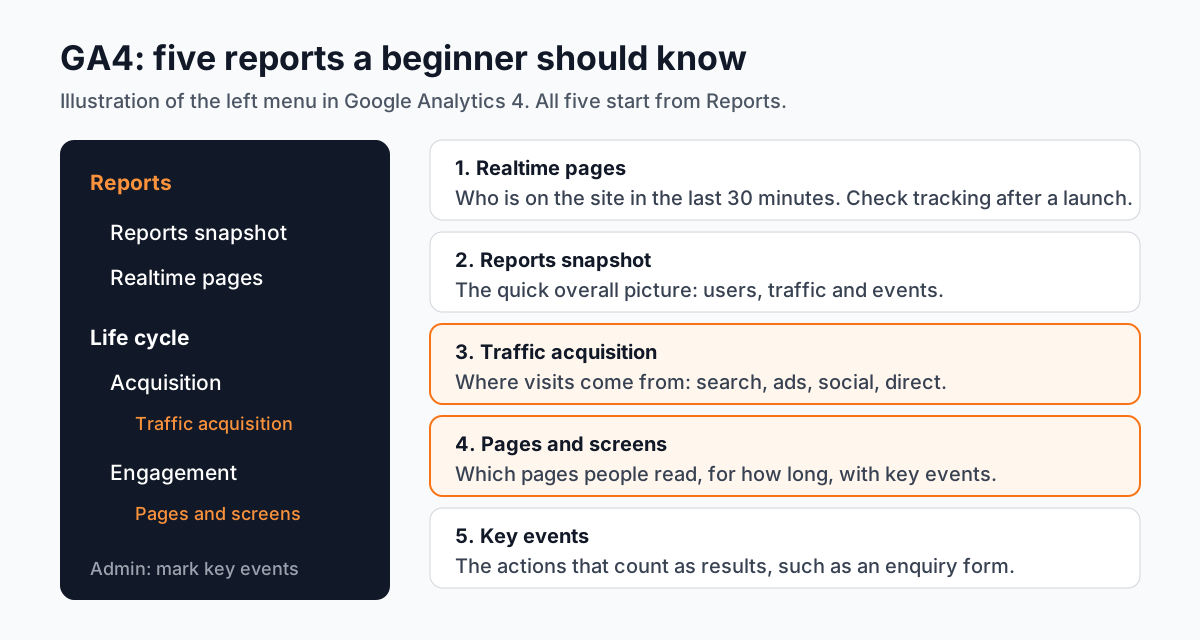
Which 5 GA4 Reports Should Every Beginner Learn First?
- 11. Realtime pages
Reports > Realtime pages. Shows the pages people are viewing and active users in the last 30 minutes[1]. Use it right after you launch a campaign or a new page to check that visits and events are being recorded.
- 22. Reports snapshot
Reports > Reports snapshot. A one-screen summary of users, traffic and events. Good for a quick daily look, not for decisions.
- 33. Traffic acquisition
Reports > Acquisition > Traffic acquisition. Shows where sessions come from: organic search, paid search, social, direct, referral and more[2]. This answers the client's favourite question: where are our visitors coming from?
- 44. Pages and screens
Reports > Engagement > Pages and screens. Lists your pages with Views, Active users, Average engagement time and Key events[3]. It tells you which pages people read and which ones lead to enquiries.
- 55. Key events
Mark the actions that matter, such as a form submit, as key events in Admin. Then the Key events column in the reports above shows which channels and pages bring results, not only visits.
How Do You Read GA4 Reports for a Real Business? A Worked Example
Take a small coaching centre that runs Google Ads and posts on Instagram. The owner asks why enquiries fell last week. Here is how a fresher should answer:
- Traffic acquisition, last 7 days compared with the 7 days before. Organic search is steady. Paid search sessions dropped by half.
- Same report, Key events column. Paid search brought most of the enquiry form submits the week before. So fewer ad visits explains fewer enquiries.
- Pages and screens. The fees page has good engagement time but almost no key events. Visitors read it and leave.
- Check Google Ads. The daily budget ran out by noon on most days.
- Your summary: "Enquiries fell because paid visits halved after the budget ran out early. Suggest raising the daily budget and adding an enquiry button on the fees page."
That is the whole skill: two or three reports, one cause, one next step. Our ChatGPT prompts for digital marketing include prompts for drafting these weekly reports once you have the numbers.
What Is the Difference Between GA4 Reports and Explorations?
Reports are ready-made views everyone on the account sees. Explorations (the Explore menu) let you build your own tables, funnels and paths. Beginners should be comfortable with Reports first. Explorations come once you know which question you are trying to answer.
Can You Use AI to Read GA4 Reports?
Yes, with care. Export a report table, paste it into ChatGPT and ask for three observations in plain English. It is quick for a first draft. Then check every number against GA4 yourself. AI tools sometimes misread columns, mix up date ranges or invent a cause that the data does not show. The client trusts your name on the report, not the AI's.
Why Do Agencies Expect Freshers to Know GA4?
Every ad, post and blog article an agency makes has to prove it worked. Clients pay for results. GA4 is where those results are counted. A fresher who can pull the right report, compare two weeks and write three clear lines becomes useful in the first month. Our digital marketing course with AI article explains how analytics fits next to content and ads in today's jobs.
Which GA4 Projects Can You Add to Your Portfolio?
- A weekly report for a real small business. Ask a relative's shop or a friend's website for view access and write four weekly summaries.
- A landing page check. Use Pages and screens to find a page with visits but no key events and suggest changes.
- A campaign tracking test. Add UTM tags to an Instagram link, then show the visits arriving in Traffic acquisition.
Choosing how to learn this? Our guide on a digital marketing course online or offline compares both.
Why Does 1-to-1 Training Help With GA4?
Analytics is learned on real data. Real data is messy. In one-to-one training the trainer works with you on live accounts, shows you why a number looks wrong and checks your summaries before they reach a client. You go at your own pace and practise on businesses from your own field.
Our digital marketing course in Delhi is the Master's Program in Digital Marketing with AI: content, SEO, Google Ads, Meta Ads, GA4 and AI tools on real accounts. Premium 1-to-1 runs 18 months and group training 12 months. Premium 1-to-1 students get the "100% Job Guarantee on Premium 1-to-1" under written terms. Timings and fees are on the digital marketing course with placement page.
Frequently Asked Questions
Which GA4 reports should beginners learn first?
Realtime pages, Reports snapshot, Traffic acquisition, Pages and screens and the Key events column. Together they show who is on the site, where visitors come from, what they read and which actions bring results.
Where is the Traffic acquisition report in GA4?
In the left menu choose Reports, then Acquisition, then Traffic acquisition.
What is a key event in GA4?
A key event is an event you mark as important for the business, such as an enquiry form submit. Key events used to be called conversions in GA4.
How long does it take to learn GA4 for a job?
The five beginner reports take a few weeks of regular practice. Writing clear reports for clients improves over a few months of real work.
Does CABA Innovatives teach Google Analytics 4?
Yes. GA4 is part of the Master's Program in Digital Marketing with AI, taught on real accounts along with content, SEO and ads.
References
- [GA4] Realtime pages report- Google Analytics Help
- [GA4] Traffic acquisition report- Google Analytics Help
- [GA4] Pages and screens report- Google Analytics Help