
What Is Google Search Console Used For?
Search Console ("Google Search Console kya hota hai" is a common search) is Google's free report card for your website in Google Search. It tells you which searches show your pages, how often people click, which pages Google has indexed and what problems stop other pages from showing.
Freshers often mix it up with Google Analytics. Simple rule: Search Console shows what happens before the click, in Google's results. GA4 shows what people do after they land on your site. Learn both; our GA4 reports for beginners guide covers the second half.
How Do You Add a Website to Search Console?
- Domain property (for example example.com): covers all subdomains and both http and https. It is verified by adding a DNS record at your domain provider[1].
- URL-prefix property (for example https://www.example.com/): covers only URLs that start with that exact address. It offers more verification methods, such as an HTML file or tag.
- Data starts collecting as soon as the property is added, even before verification is complete[1].
Which 5 Search Console Reports Should a Beginner Learn First?
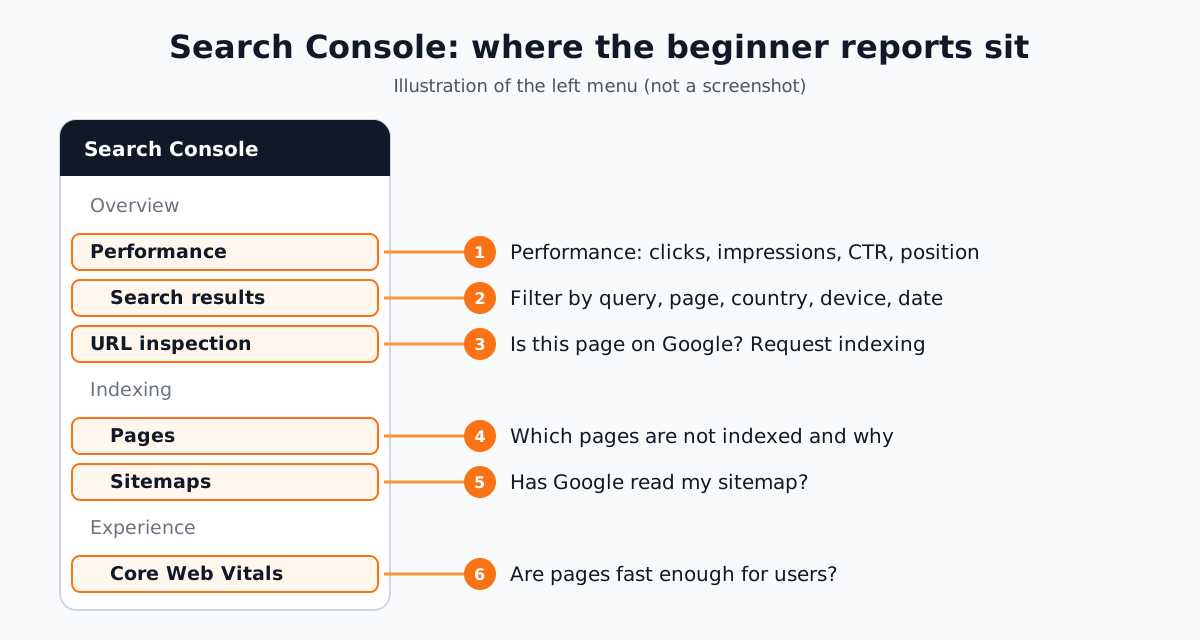
| Report | Where | Question it answers |
|---|---|---|
| Performance | Performance > Search results | Which searches show my site? Do people click? |
| URL inspection | Search bar at the top | Is this one page on Google? Can I ask Google to crawl it? |
| Pages | Indexing > Pages | Which pages are not indexed and why? |
| Sitemaps | Indexing > Sitemaps | Has Google read my list of pages? |
| Core Web Vitals | Experience > Core Web Vitals | Do my pages load and respond fast enough for users? |
How Do You Read the Search Console Performance Report?
The Performance report shows four numbers[2]: clicks (people who clicked through from Google), impressions (how often your site appeared in results), CTR (clicks divided by impressions) and average position (the average spot of your top result). You can split them by query, page, country, device, search appearance and date.
- Tick all four metric boxes at the top so the table shows position too.
- Use the date filter's Compare tab to see this week against last week.
- Look for queries with many impressions but low CTR: the page shows, but the title does not attract clicks.
- Look for queries at position 8 to 20: these are the quickest to push onto page one.
The newest data can be preliminary for a few hours and is shown as a dotted line[2], so do not panic over today's numbers.
URL Inspection, Pages and Sitemaps: Getting Pages Indexed
Type any full URL from your site into the search bar at the top to open URL inspection. It shows whether the page is on Google, the canonical Google picked and any problems. Test live URL checks the page as it is now. Request indexing asks Google to crawl it. There is a daily limit and a request does not guarantee the page will be indexed[3].
The Pages report lists indexed and not-indexed URLs with a reason for each, such as "Crawled - currently not indexed", "Duplicate without user-selected canonical", "Page with redirect" or "Not found (404)". Google says you should not expect all URLs to be indexed, only the canonical pages. Some not-indexed URLs are fine. After you fix an issue, click Validate fix; validation typically takes up to about two weeks[4].
For many new pages at once, submit a sitemap under Sitemaps instead of inspecting each URL. Google's own advice is the same: URL inspection for a few URLs, a sitemap for many[5].

How Do You Use AI With Search Console?
In December 2025 Google announced an experimental AI-powered configuration in the Performance report[6]. You type a question in plain English and it sets the filters, comparisons and metrics for you. It is rolling out to a limited set of sites, works only for the Search results report (not Discover or News), cannot sort or export. Google warns it can misread requests.
Compare clicks and average position for pages that contain '/blog' in the last 28 days against the previous 28 days.
Before reading the numbers, check which filters and dates it actually applied.
You can also export the Queries table and ask ChatGPT, Claude or Gemini to group queries by topic or suggest title ideas. The human still checks the data, decides which pages to change and makes sure titles stay honest. CABA's courses now teach AI and agentic AI workflows inside the curriculum, always with this human check.
Why Does Search Console Matter in Digital Marketing Jobs?
Every SEO, content and website role needs proof that the work is bringing search traffic. Search Console is where that proof comes from. On 17 October 2026 Internshala listed 74 fresher SEO roles in Delhi NCR[7]. Three, in our own words (company names left out):
- SEO internship, Delhi, 6 months. Find topics for videos and blogs, work on rankings. Skills listed include Google Analytics, SEM and digital marketing. Stipend shown: ₹5,000 to ₹15,000 a month.
- Digital marketing executive, Delhi NCR (hybrid). Maintain several websites and do on-page SEO in WordPress. Pay shown: ₹2.4 to 3 lakh a year.
- Technical content writer (AI, SEO, AEO, GEO), Gurgaon. Write content built to rank in search and AI answers. Pay shown: ₹2 to 6 lakh a year.
Freshers who can open Search Console and explain a drop in clicks stand out in interviews. Paid ads need the same habit of reading data; see our Google Ads mistakes to avoid.
3 Search Console Projects for Your Portfolio
- 1Set up and verify a real site
Add a Domain property for your own blog or a relative's business site, verify it with DNS and submit the sitemap. Screenshot each step.
- 2Quick-win report
Find 10 queries at positions 8 to 20 with good impressions. For each, write which page ranks and one change to its title or content.
- 3Indexing fix log
From the Pages report, list every not-indexed reason, decide which are fine and which need a fix, then track Validate fix.
Worked example of project 2: say a Delhi coaching centre's page shows for "spoken english classes in lajpat nagar" at position 11 with 300 impressions and 3 clicks a month. The page title says only "Courses". You suggest a title with the course and area, add a short FAQ the searcher wants answered and recheck in 4 weeks. That before-and-after is exactly what interviewers like to see.
Why Does One-to-One Training Help With Search Console?
Search Console looks simple, but reading it well takes judgement: is a drop a real problem, a seasonal dip or a reporting delay? In one-to-one training a trainer sits with you on a live site, shows you how to read the numbers and checks your conclusions before you present them.
Our digital marketing course in Delhi covers Search Console with SEO, GA4, Google Ads and Meta Ads, with AI tools, in South Delhi or live online. The Premium plan carries a 100% Job Guarantee; read the job guarantee terms. Want the wider picture first? See is digital marketing easy to learn, then ask about the digital marketing course with placement.
Frequently Asked Questions
What is Google Search Console used for?
It shows how a website performs in Google Search: which searches show its pages, clicks, impressions, CTR and average position, which pages are indexed and what problems stop others from being indexed.
Is Google Search Console free?
Yes. Anyone who owns or manages a website can add it to Search Console for free with a Google account.
What is the difference between Search Console and Google Analytics?
Search Console shows what happens in Google's results before someone clicks. Google Analytics shows what visitors do after they land on the site. Marketers use both together.
How long does Request indexing take in Search Console?
Often about a day, but it can take longer. A request does not guarantee indexing. For many pages, submit a sitemap instead.
Does CABA Innovatives teach Google Search Console?
Yes. Search Console is part of CABA's digital marketing course along with SEO, GA4, Google Ads, Meta Ads and AI tools, in Delhi or live online.
References
- Add a website property to Search Console- Google Search Console Help
- Performance report (Search results)- Google Search Console Help
- URL Inspection tool- Google Search Console Help
- Page indexing report- Google Search Console Help
- Ask Google to recrawl your URLs- Google Search Central
- AI-powered configuration in the Search Console Performance report (blog post, 4 December 2025)- Google Search Central Blog
- SEO Fresher Jobs in Delhi (listings viewed 17 October 2026)- Internshala