Where Are the Preferences in After Effects?
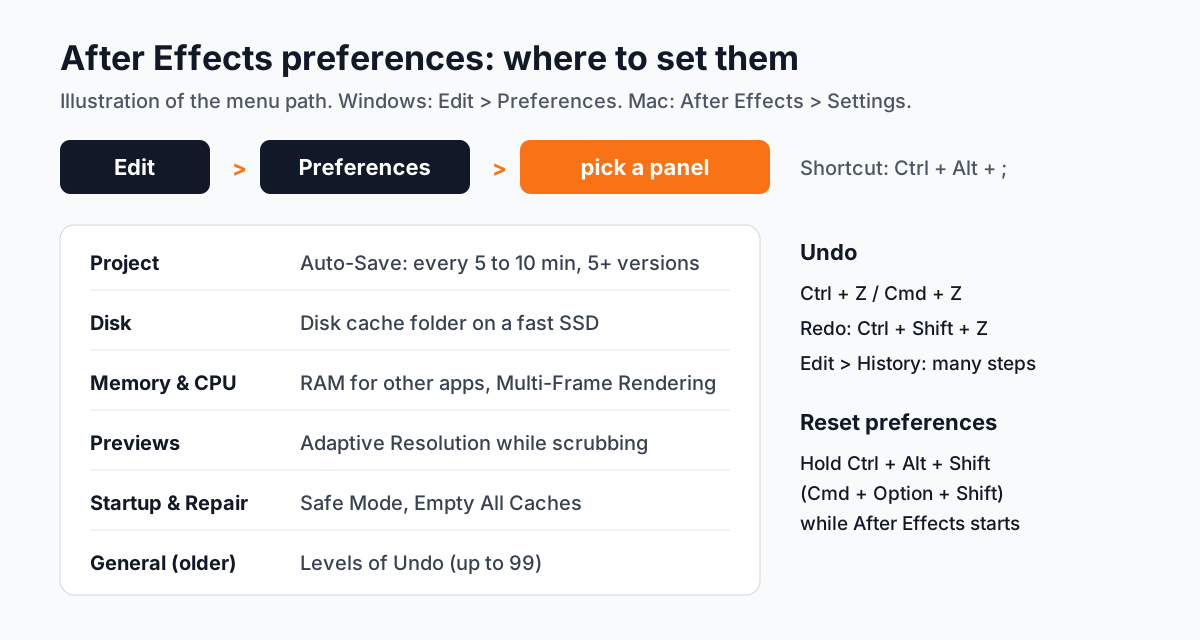
On Windows go to Edit > Preferences and pick a category. On Mac it is After Effects > Settings. The quickest way is the shortcut Ctrl + Alt + ; on Windows or Cmd + Option + ; on Mac, which opens the first panel[1].
Adobe has reorganised the panels in recent versions. The help page we checked on 9 October 2026 lists Startup & Repair, Project, Composition, Previews, Appearance, Import, Export, Audio, Disk, Memory & CPU, Video, 3D and Scripting & Expressions among others. If a setting is not where an old tutorial says, check the newest Adobe page.
How Many Undos Do You Get in After Effects?
Adobe's help says you can undo as many as 99 of your most recent changes[2]. In many versions the number is set by Levels of Undo in the General preferences, often 32 by default. More undo levels use more memory, so on an 8 GB laptop keep it moderate.
| Action | Windows | Mac |
|---|---|---|
| Undo | Ctrl + Z | Cmd + Z |
| Redo | Ctrl + Shift + Z | Cmd + Shift + Z |
| Jump back several steps | Edit > History | Edit > History |
| Back to last save | File > Revert | File > Revert |
Undo only works on changes to the project. Scrolling a panel or picking a tool is not recorded. A good habit from Adobe's own help: lock a layer you want to see but not change, so you do not need undo at all.
Which After Effects Preferences Should You Set on Day One?
- 11. Auto-Save (Project panel)
Turn it on and choose Save every 5 to 10 minutes. Set Maximum Project Versions to 5 or more so a bad save does not replace your only good copy. Keep the location Next to Project so the versions travel with the project folder[1].
- 22. Save when starting render queue
In the same Auto-Save section. It saves the project every time you add something to the render queue, a moment when crashes are common.
- 33. Disk cache (Disk panel)
Keep Enable Disk Cache on, choose a folder on your fastest SSD and give it a sensible maximum size. Cached frames make previews play back faster.
- 44. Memory (Memory & CPU panel)
RAM reserved for other applications decides how much After Effects can use. Close the browser and lower this number when you work on heavy compositions.
- 55. Multi-Frame Rendering (Memory & CPU panel)
Lets After Effects render several frames at the same time on multi-core processors. Keep it on unless a plugin misbehaves.
- 66. Previews (Previews panel)
Adaptive Resolution lowers preview quality while you drag or scrub so the screen stays responsive. Your final render is not affected.
How Do You Reset After Effects Preferences When It Keeps Crashing?
Corrupt preferences cause many strange crashes. Hold Ctrl + Alt + Shift on Windows or Cmd + Option + Shift on Mac while After Effects is starting and confirm when asked[1]. All preferences go back to default, so note your custom settings first.
Before a full reset, try Start in Safe Mode from the Startup & Repair panel. It opens After Effects with third-party plugins switched off. If the problem goes away, a plugin or your preferences are the cause.
How Do You Use AI With After Effects and Still Stay in Control?
Two uses we see work well. First, ask ChatGPT to write an expression, for example a wiggle that only moves on the X axis, then read it, test it and fix it. Second, make 3D elements with AI tools and animate them in After Effects, as explained in our 3D motion graphics with AI and After Effects guide. In both cases save a version before you paste anything new, so undo and Auto-Save can bring you back.
Why Do Studios Expect Motion Designers to Know These Settings?
In a studio nobody fixes your machine for you at 9 pm before a delivery. A fresher who knows where Auto-Save versions are, how to clear the cache and how to reset preferences saves the project and the deadline. Senior designers notice that within the first week. It is also why After Effects set-up questions show up in practical tests.

Video editors face the same set-up questions in Premiere Pro. Our make Premiere Pro faster guide covers the editing side.
Which After Effects Projects Should a Beginner Build?
- A lower thirds pack. Five name-and-title animations in one brand style.
- A logo animation. 5 to 8 seconds, with sound, for a real or practice brand.
- A kinetic typography Reel. 15 seconds of animated text timed to a voice-over.
Worked example (project 1): make a 1920 x 1080 composition, 5 seconds. Draw a bar with the Rectangle tool on a shape layer. Add the name and title as two text layers. Animate the bar's Scale from 0 to 100% on the X axis over 12 frames, then animate the text Position up by 20 pixels with Opacity from 0 to 100%. Select the keyframes and apply Easy Ease (F9). Duplicate the composition for the other four names. Save a version before each change in style. New to the software? Start with After Effects for beginners.
Why Does 1-to-1 Training Help With After Effects?
After Effects punishes bad habits: no saved versions, a full C drive, effects stacked without pre-composing. In one-to-one training the trainer watches your screen, sets preferences for your own laptop and corrects habits before they cost you a project. You learn at your pace on projects from your own field.
Our 10-month motion graphics course in Delhi covers Illustrator, Photoshop, InDesign, Premiere Pro, After Effects and AI tools with real projects. Over time motion designers usually earn 30 to 40% more than video editors. Premium 1-to-1 students get the "100% Job Guarantee on Premium 1-to-1" under written terms. See how to become a motion graphics designer for the full path. The After Effects and motion graphics course page for timings and fees.
Frequently Asked Questions
Where are the preferences in After Effects?
On Windows: Edit > Preferences. On Mac: After Effects > Settings. The shortcut is Ctrl + Alt + ; on Windows or Cmd + Option + ; on Mac.
How many undos does After Effects allow?
Adobe's help says you can undo up to 99 of the most recent changes. Use Edit > History to jump back several steps at once.
How do I reset After Effects preferences?
Hold Ctrl + Alt + Shift on Windows or Cmd + Option + Shift on Mac while After Effects starts. Note your custom settings first, because all preferences go back to default.
Where does After Effects save auto-save files?
With the Next to Project option, in an Auto-Save folder beside the project file. You can change the location, the interval and the number of versions in the Project preferences.
Does CABA Innovatives teach After Effects set-up in the motion graphics course?
Yes. Students learn After Effects on real projects, including preferences, Auto-Save, cache and safe working habits. Details are on the motion graphics course page.
References
- Setting preferences in After Effects- Adobe Help Center (After Effects)
- General user interface items in After Effects (Undo changes)- Adobe Help Center (After Effects)