What Are Expressions in After Effects?
Adobe describes an expression as a small piece of JavaScript code that you plug into an animated property; it tells that property what to do at each moment in time[1]. The difference from a script is simple: a script tells the application to do something, an expression tells one property to do something.
Why bother? Say a logo should float gently for 20 seconds. With keyframes you would set dozens of positions by hand. With one line, wiggle(1,10), it floats on its own. If you are new to the software, read After Effects for beginners first, then come back here.
How to Add Your First Expression
- 1Make a layer
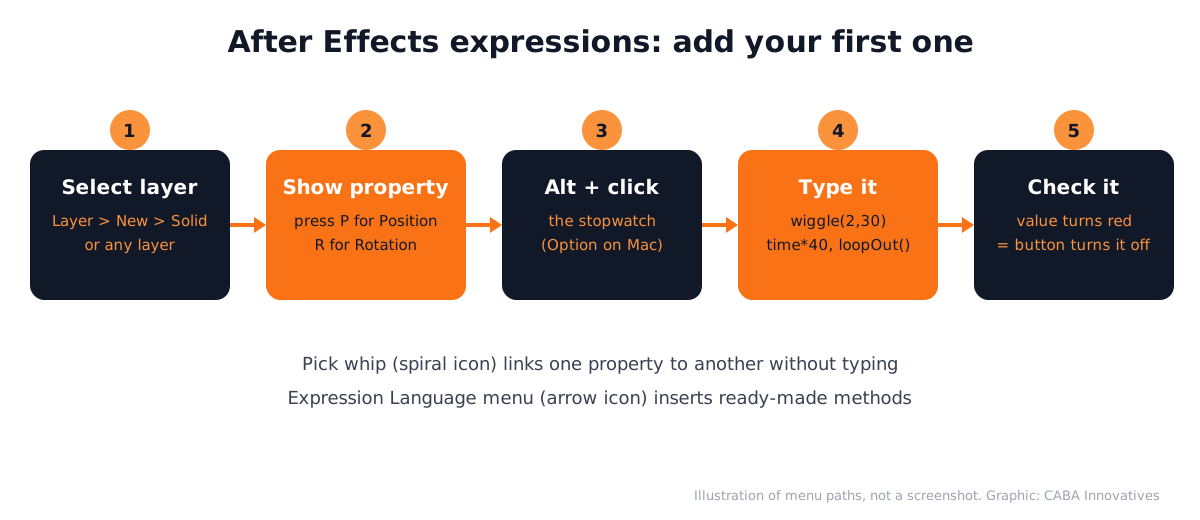
Create a composition and choose Layer > New > Solid (or use any shape or text layer).
- 2Show the property
Select the layer in the Timeline and press P to show Position (R shows Rotation, T shows Opacity).
- 3Turn on the expression
Alt + click on Windows, or Option + click on Mac, the stopwatch next to the property. The value turns red, which means an expression is active.
- 4Type the expression
Click the expression text in the Timeline and type, for example, wiggle(2,30).
- 5Confirm
Press Enter on the numeric keypad or click outside the field. Play the timeline to see it work.
Next to the expression you will see four small buttons. The equals sign turns the expression on and off. The graph button shows its values in the Graph Editor. The spiral is the pick whip. The arrow opens the Expression Language menu, which inserts ready-made methods for you[1].
5 Basic After Effects Expressions to Learn First
| Expression | Put it on | What it does |
|---|---|---|
| wiggle(2,30) | Position | Moves the layer randomly 2 times a second, up to 30 pixels |
| time*40 | Rotation | Rotates forever at 40 degrees per second |
| loopOut() | Any keyframed property | Repeats your keyframes until the end of the timeline |
| value+90 | Rotation | Adds 90 degrees to whatever the property already had |
| Pick whip link | Any property | Makes one property follow another, such as one layer's rotation driving another's |
Adobe's own examples use these same patterns: wiggle(2,30) on Position, time*40 for rotation and loopOut("cycle") for repeating animation[1]. You can also do simple maths at the end of any expression: *2 doubles the result and /2 halves it.
Why Expressions Matter in Real Motion Graphics Jobs
Studios and brand teams make the same kind of animation again and again: logo stings, lower thirds, social posts in three sizes. Expressions let one change flow through a whole project. A motion designer who can read a simple expression in a template and fix it when it breaks is faster and easier to work with.
- Templates: Adobe notes expressions are used in Motion Graphics templates, where editors change text and colours safely[1].
- Linked controls: one slider can drive several layers, so a client change takes minutes, not hours.
- Loops for social media: looping backgrounds and icons for Reels need loopOut(), not hand-copied keyframes.
Expressions pair well with keyboard speed. Our After Effects shortcuts guide covers the keys that reveal properties quickly.
3 Portfolio Projects Using Expressions
- Floating logo loop: wiggle(1,8) on Position and a slow time*10 on Rotation for a 10-second looping logo.
- Animated price tag for a Reel: keyframe a bounce once and repeat it with loopOut().
- Linked lower third: a name strip where the background bar follows the text layer using the pick whip.
Worked example: say a cafe in Hauz Khas wants a 10-second looping Reel background with its logo. Animate the cup icon rising for one second with two keyframes, add loopOut("cycle") so it repeats, put wiggle(1,6) on the steam layer so it drifts naturally and use time*15 on a small circle behind the logo. Four short lines replace about 40 keyframes. For the logo itself, see logo animation in After Effects; for text movement, kinetic typography in After Effects.

Make the Expression Editor Easier to Read
You can change how expressions look in the Timeline from the Scripting & Expressions preferences: on Windows choose Edit > Preferences > Scripting & Expressions, on Mac choose After Effects > Settings > Scripting & Expressions[1]. A larger font and clear colours help a lot when you are learning.
Video editors who handle graphics also meet expressions inside templates. If you are on that side, what does a video editor do shows where graphics fit into the job.
AI and Agentic AI With Expressions Today
Motion designers now ask ChatGPT, Claude or Gemini to write or explain an expression, for example "make this layer bounce when it lands". Adobe has also shown an AI assistant for After Effects, in private beta since June 2026[2].
What the human still decides: whether the movement looks right, whether the timing fits the music and whether the expression actually works on that property. AI-written expressions often have small errors, so always test them on a copy of the layer. CABA's courses now teach AI and agentic AI workflows inside the curriculum, with a human check on every output.
Why 1-to-1 Training Helps With Expressions
Expressions are where many self-taught learners give up, usually because of one missing bracket or a wrong property. A trainer sitting with you spots the error in seconds and explains why, so you learn the pattern instead of copying blindly.
Our motion graphics course in Delhi covers After Effects from keyframes to expressions and templates, with AI tools and real projects for your portfolio. It comes with a 100% Job Guarantee; read the job guarantee terms. See the month-by-month plan on the motion graphics course page.
Frequently Asked Questions
What are After Effects expressions used for?
After Effects expressions are used to automate movement such as wiggle, rotation and loops, to link one property to another and to build templates, so you need far fewer keyframes.
Do I need to know JavaScript to use After Effects expressions?
No. Expressions are based on JavaScript, but beginners start by copying short ones like wiggle(2,30) and changing the numbers. You learn the patterns over time.
How do I add an expression in After Effects?
Alt + click on Windows, or Option + click on Mac, the stopwatch next to a property in the Timeline, type the expression and click outside the field. The value turns red when an expression is active.
What is the After Effects expression for continuous rotation?
Put time multiplied by a number on the Rotation property, for example time*40, which rotates the layer 40 degrees per second for as long as the layer lasts.
How do I loop an animation in After Effects?
Set your keyframes once, then add loopOut() or loopOut("cycle") as an expression on that property. The animation repeats until the end of the timeline.