

What Are Meta Lead Ads and Why Do Businesses Use Them?
Meta describes lead ads as a way to find people who may be interested in your products or services and collect their information on Facebook and Instagram. You can create them from your Facebook Page, Meta Business Suite or Meta Ads Manager[1].
In India they are everywhere: coaching institutes collecting admission enquiries, real estate projects collecting site-visit requests, clinics booking consultations, car dealers booking test drives. The person taps the ad, a short form opens with their name and phone number already filled in. They submit in seconds. That is why every digital marketer is expected to know them.
How to Create a Meta Lead Ad in Ads Manager
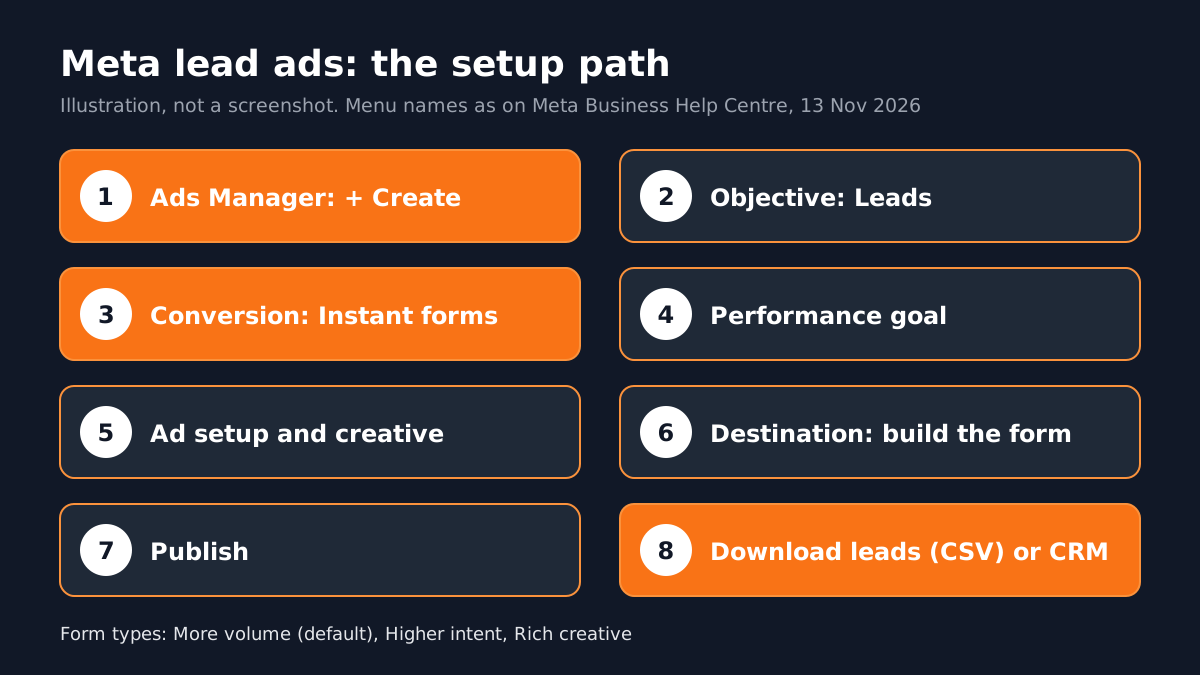
These steps follow Meta's help page on creating a lead ad in Ads Manager[1]:
- 1Start a Leads campaign
Go to Ads Manager, click + Create, select Leads as the campaign objective and click Continue. New campaigns now start as Advantage+ leads campaigns.
- 2Choose the conversion location
At the ad set level, in the Conversion section, pick Instant forms. Other options include Website, Messenger, Instagram, WhatsApp, Calls and combinations such as Website and instant forms.
- 3Pick a performance goal
Maximise number of leads is the usual start. Maximise number of qualified leads needs a connected CRM or Meta source; Meta notes that from April 2026 qualified leads needs Conversions API integration for new campaigns.
- 4Set up the ad
In Ad setup, choose Single image or video, or Carousel, then add your creative and text.
- 5Build the instant form
In Destination, create the form: form type, intro, questions, privacy policy link and a thank-you screen.
- 6Tracking and publish
Under Tracking you can set up CRM, website or app events. Then click Publish.
New to Ads Manager itself? Start with our Meta Ads Manager guide for beginners, then come back to this one.
More Volume, Higher Intent or Rich Creative: Which Form Type?
| Form type | What it does | Use it when |
|---|---|---|
| More volume (default) | Quick to submit on a phone, built to bring more leads | You can call many leads quickly and want reach |
| Higher intent | Adds a note that the business may follow up and a review screen before submit | Each lead needs a serious follow-up, such as a site visit or counselling |
| Rich creative | Your colours, images and extra text inside the form | People need more context about the product before they submit |
Meta notes that higher intent forms show only in Facebook Feed and Instagram feed on mobile, not on desktop[2].
Where Do the Leads Go and How Fast Should You Call?
Lead details stay in Meta until you take them out. You can download them as a CSV file from Ads Manager, from the Instant forms page in Meta Business Suite or from Leads Centre in Business Suite, or receive them through a connected CRM or the API[3].
The real work starts after the form. A lead who filled a form at 9 pm has probably also filled two other forms by 10 pm. Teams that call within minutes, or send a WhatsApp message straight away, usually win the enquiry. Plan the follow-up before you spend the first rupee.

To measure which campaigns bring real customers and not only forms, read our guide to Google Ads conversion tracking; the same thinking applies across platforms.
Why Lead Ads Matter in Digital Marketing Jobs
Many first jobs in digital marketing are performance roles for local businesses, where the main number is cost per lead. Knowing how to set up a lead ad, write a short form, connect leads to a sheet or CRM and report lead quality to the client is a daily skill. See digital marketing jobs for freshers for the roles that use it.
Before you launch, Meta also asks advertisers to have their questions reviewed against the Lead Ads Terms and Advertising Standards. You can add a privacy policy link to the form[1]. Collecting phone numbers is a responsibility, not only a target.
Portfolio Projects You Can Build With Meta Lead Ads
- Coaching centre admissions: a Higher intent form with one question about the class, plus a follow-up script and a simple daily lead sheet.
- Dental clinic consultation: a More volume form, a WhatsApp follow-up message and a weekly report of cost per lead and booked visits.
- Boutique wedding season enquiry: a Rich creative form showing the collection, with a question about the event date.
Worked example for the coaching centre: write the offer (free demo class), make two ad creatives, build a form asking name, phone and class, set a thank-you screen with the centre's timings, then write the call script and a sheet with columns for called, interested, visited and joined. Even without spending money, this plan shows an employer you understand the whole funnel.
AI and Agentic AI in Lead Generation Today
Meta's own tools now lean on automation: new Leads campaigns start as Advantage+ leads campaigns, campaign score suggests changes before you publish and opportunity score offers recommendations from the Account overview, which Meta says do not guarantee performance[1]. Marketers also use ChatGPT or Gemini to draft ad text and form questions. Some teams use AI agents that read new leads and send a first WhatsApp reply.
What the human still decides: the offer, the budget, which recommendations to accept, whether the ad is honest and whether leads are turning into real customers. CABA's courses now teach AI and agentic AI workflows inside the curriculum, with the marketer approving every change.
Why One-to-One Training Helps With Ads
Ads Manager changes often. The first campaigns are where money gets wasted. With a trainer beside you, you learn on live examples: why a form gets leads but no admissions, why cost per lead jumped this week, which question to remove. Typical pay for digital marketers in Delhi NCR: freshers ₹18,000 to ₹25,000 a month, ₹30,000 to ₹35,000 after 6 months and ₹60,000 to ₹65,000 by year 3; more detail in digital marketing fresher salary in India.
Our digital marketing course in Delhi covers Meta Ads, Google Ads, GA4 and AI tools through real campaigns. It comes with a 100% Job Guarantee; read the job guarantee terms. See the full plan on the digital marketing course page.
Frequently Asked Questions
What are Meta lead ads?
Ads on Facebook and Instagram that open a short form inside the app, so people can share their contact details without visiting a website.
How do I create a lead ad in Meta Ads Manager?
Click + Create, choose Leads, select Instant forms as the conversion location, set up the ad and form, then publish.
Can Meta lead ads send leads to WhatsApp?
WhatsApp is one of the conversion locations in a Leads campaign, which starts a chat instead of opening a form.
How do I download leads from Meta lead ads?
As a CSV from Ads Manager, the Instant forms page in Meta Business Suite or Leads Centre, or through a connected CRM.
Which instant form type should I choose?
More volume for many quick leads, Higher intent when each lead needs a serious follow-up, Rich creative when people need more context.
References
- How to create a lead ad using Meta Ads Manager- Meta Business Help Centre
- About instant form types- Meta Business Help Centre
- Download or retrieve your leads data from Meta- Meta Business Help Centre