Why Does Voice-Over Quality Matter in Video Work?
Viewers forgive a slightly soft shot. They do not forgive a voice that is too quiet, echoing or full of fan noise. Explainers, YouTube videos, ads and course videos all depend on a clear voice. Many small teams expect the video editor to clean it.
That is why studios ask editors to know basic sound work, not only cutting. Our video editing for content creators guide puts sound right after cutting in the learning order for the same reason.
How Do You Record a Voice-Over in Adobe Audition?
Adobe's recording guide (updated 17 June 2026) explains two ways to record[1]:
- 1Pick your microphone
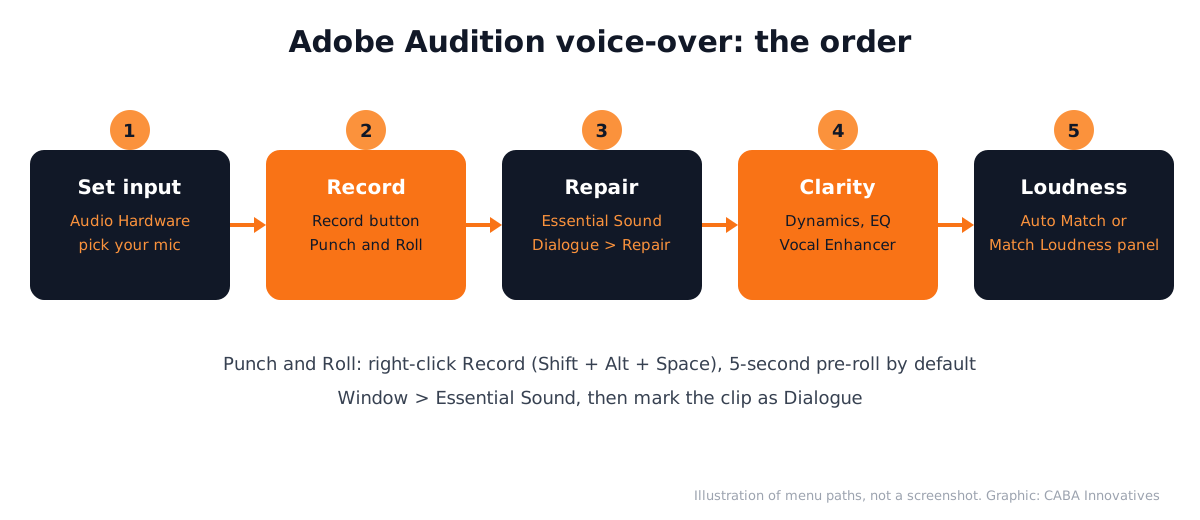
Choose your microphone as the input in Audition's Audio Hardware settings, then speak at normal volume and watch the meters. Keep the loudest words below the red.
- 2Waveform Editor: one file
Create a new file (or open one), place the current-time indicator and press the Record button at the bottom of the Editor panel. Good for a single voice-over take.
- 3Multitrack Editor: takes on tracks
Choose the input from the track's Input menu and press Arm For Record on the track. Audition saves each recorded clip as a WAV file in the session's _Recorded folder.
- 4Fix a fluffed line with Punch and Roll
Right-click the Record button and choose Punch and Roll Mode (Shift + Alt + Space). Playback rolls in for the pre-roll time, then recording punches in. The pre-roll is 5 seconds by default, set in Preferences > Playback and Recording.
- 5Repair DC Offset if you hear a click at the start
In the Waveform Editor, choose Favorites > Repair DC Offset. Some sound cards add a small offset that causes clicks at the ends of a file.
Which Essential Sound Settings Clean a Voice-Over?
Open Window > Essential Sound with a clip selected in a multitrack session and mark it as Dialogue[2]. Then use these groups:
| Group | Setting | What it fixes |
|---|---|---|
| Repair | Reduce Noise (0 to 10) | Steady background noise, such as room hiss and fan noise |
| Repair | Reduce Rumble | Very low sounds below 80 Hz, such as traffic or desk bumps |
| Repair | DeHum (50 Hz in India) | Electrical hum from cables |
| Repair | DeEss | Harsh "s" sounds |
| Clarity | Dynamics | Evens out loud and soft words (compression) |
| Clarity | EQ | Boosts or cuts frequencies with presets you can edit |
| Clarity | Vocal Enhancer | High Tone or Low Tone to suit the voice |
Use small amounts first. Too much noise reduction makes a voice sound like it is under water. For heavy noise, the full Noise Reduction effect with a noise print gives more control; our Adobe Audition noise reduction guide covers it step by step.
How Loud Should a Voice-Over Be?
In Essential Sound, expand Loudness and click Auto Match; Audition shows the level it matched to in LUFS[2]. For several files, open Window > Match Loudness, drop the files in, click Scan, choose a standard under Match To, set the Maximum True Peak Level and click Run[3].
Adobe's list includes broadcast standards such as EBU R128 (target -23 LUFS, true peak -1 dB) and ATSC A/85 (target -24 LUFS, true peak -2 dB)[3]. Online platforms may have their own guidance, so check the platform's current help page and always listen to the final export on a phone and on headphones.

Using Audition With Premiere Pro
Most editors cut in Premiere Pro and send the voice to Audition only when it needs real repair. Premiere also has Enhance Speech in its Essential Sound panel, an AI feature with a Mix Amount slider for quick fixes[4]. Once the voice is clean, set the export using our Premiere Pro settings for Instagram Reels guide.
3 Voice-Over Projects for Your Portfolio
- 60-second explainer voice-over: script, record, clean and level, then lay it under a simple animation. A natural partner to a motion graphics portfolio piece.
- YouTube video with before and after: show the raw room recording and the cleaned version side by side.
- Hindi and English versions of one ad: same visuals, two voice tracks, both matched to the same loudness.
Worked Example: A Coaching Centre Explainer
Say a coaching centre in Laxmi Nagar wants a 60-second admission explainer. Here is how an editor can handle the voice:
- 1Record
Record the script in the Multitrack Editor in a small room with curtains and a bed or sofa nearby, two full takes.
- 2Fix
Use Punch and Roll to redo the two lines where the speaker stumbled.
- 3Clean
Essential Sound > Dialogue: Reduce Noise low, Reduce Rumble on, DeEss low.
- 4Clarity
Dynamics on, a light EQ preset for voice, Vocal Enhancer only if the voice sounds thin.
- 5Level and deliver
Auto Match loudness, export a WAV for the editor and listen on a phone before sending.
AI and Agentic AI in Voice-Over Work Today
Editors use Enhance Speech in Premiere for quick clean-ups and AI voice tools for scratch voice-overs while the real voice is being booked. Adobe's AI assistant is in public beta in Premiere[5].
What the human still decides: whether the voice sounds natural, whether the pronunciation of names and Hindi words is right and whether you have permission to use any AI or cloned voice. Never use someone's voice without consent. CABA's courses now teach AI and agentic AI workflows inside the curriculum, with a human check on every output.
Why 1-to-1 Training Helps With Sound
Sound problems are hard to learn from a video, because you cannot hear what the tutor hears in your room. With a trainer next to you, you hear the difference between too much and just enough noise reduction on your own recording. Our video editing course in Delhi covers Premiere Pro, After Effects and sound editing and syncing, in classroom and live online formats.
The course comes with a 100% Job Guarantee; read the job guarantee terms. See the full plan on the video editing course page.
Frequently Asked Questions
How do I record a voice over in Adobe Audition?
Choose your microphone in the Audio Hardware settings, then press Record at the bottom of the Editor panel in the Waveform Editor, or arm a track and record in the Multitrack Editor. Use Punch and Roll to re-record a single line.
What are the best Adobe Audition voice over settings?
In Essential Sound, mark the clip as Dialogue, use small amounts of Reduce Noise, Reduce Rumble and DeEss, turn on Dynamics and a light EQ, then use Loudness Auto Match. Adjust by ear for each voice.
How do I make my voice sound professional in Audition?
Record in a quiet, soft room with a pop filter, keep levels out of the red, clean gently with Essential Sound and match the loudness. Most of the result comes from the recording, not the effects.
What is Punch and Roll in Adobe Audition?
It is a record mode that plays a few seconds before your punch-in point and then starts recording, so you can redo one line naturally. The pre-roll is 5 seconds by default.
Can I use Adobe Audition with Premiere Pro for voice-overs?
Yes. Many editors cut in Premiere Pro and send the voice clip to Audition for repair, or use Enhance Speech in Premiere for quick fixes.
References
- Recording audio (Audition User Guide, updated 17 June 2026)- Adobe Help Center
- Edit, repair and improve audio using Essential Sound panel- Adobe Help Center
- Matching loudness across multiple audio files- Adobe Help Center
- Enhance speech in Premiere- Adobe Help Center
- Adobe Unveils Major Expansion of Creative Agent Across Firefly and Creative Cloud Apps (18 June 2026)- Adobe Newsroom