Why Do Employers Expect You to Know InDesign?
Photoshop is for photos and Illustrator is for logos and drawings. InDesign is for pages: brochures, menus, magazines, catalogues, school prospectus and books. Publishers and print-heavy businesses expect designers to deliver clean, print-ready InDesign files.
On 29 October 2026, Internshala's Delhi graphic design listings included a typography designer role at a publishing house, open to freshers, asking for Photoshop, MS Word and InDesign (pay shown ₹2.64 to 3 lakh a year). It also listed a visual artist associate role in Gurgaon, also open to freshers, listing InDesign alongside Photoshop, Illustrator, After Effects and Figma (₹4.5 to 5 lakh a year)[1].
Tip 1 and 2: Use Paragraph and Character Styles
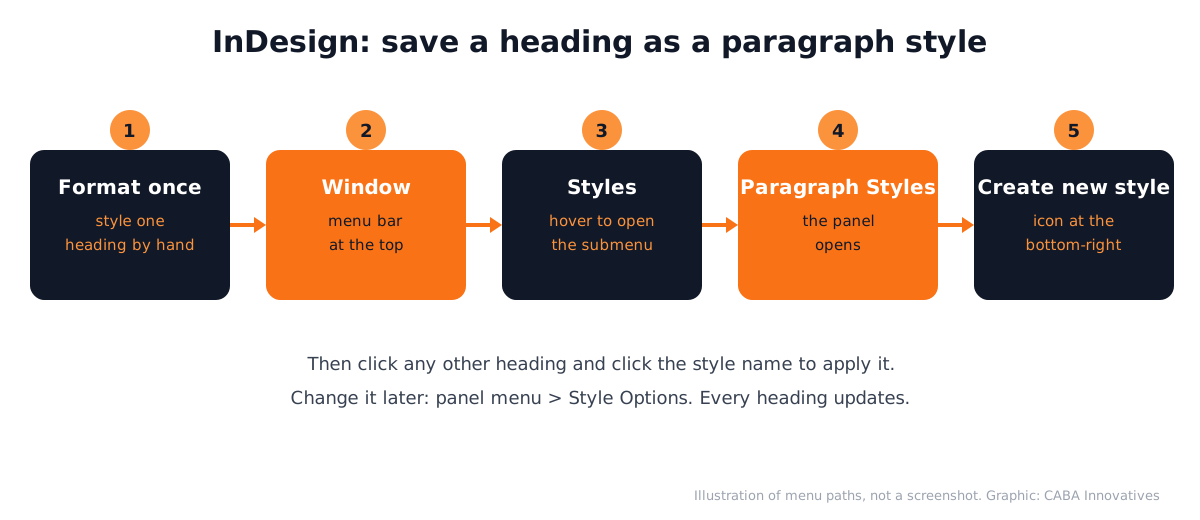
A paragraph style saves the font, size, spacing and colour of a whole paragraph. A character style saves formatting for a few words, like a bold price inside a line. Adobe's help explains the steps[2]:
- 1Format one heading by hand
Get it exactly right once.
- 2Open the panel
Window > Styles > Paragraph Styles (or Character Styles).
- 3Save it
With the text selected, click the Create new style icon at the bottom-right of the panel.
- 4Apply it everywhere
Click in any other heading and click the style name.
- 5Change it later in one place
Panel menu > Style Options. Every heading using that style updates.
Tip 3 and 4: Put Repeating Items on Parent Pages
Parent pages, previously known as master pages, hold anything that repeats: the logo, page numbers, a footer line and guides. Every new document starts with A-Parent. Adobe's steps[3]:
- Create one: Window > Pages, then the panel menu > New Parent. Give it a prefix of up to four characters and choose 1 to 10 pages.
- Apply to one page: drag the parent onto a page icon until a black rectangle appears around it.
- Apply to many pages: select the pages, then Alt-click (Windows) or Option-click (macOS) the parent.
- Base one parent on another: for example, a chapter-opening parent that shares the footer of the main parent.
Need to change a parent item on just one page? Adobe's help says Ctrl + Shift-click (Windows) or Command + Shift-click (macOS) overrides it on that page.
Tip 5 to 8: The Shortcuts That Matter Most
These are from Adobe's default InDesign shortcuts page (updated 14 October 2026)[4]:
| Task | Windows | macOS |
|---|---|---|
| Selection tool | V or Esc | V or Esc |
| Direct Selection tool | A | A |
| Type tool | T | T |
| Rectangle Frame tool | F | F |
| Switch Normal and Preview mode | W | W |
| Increase or decrease point size | Shift + Ctrl + > or < | Shift + Command + > or < |
| Show or hide all panels | Tab | Tab |
| Fit spread in the window | Double-click the Hand tool | Double-click the Hand tool |
W is the one beginners forget. Preview mode hides guides and frame edges, so you see the page as the reader will.
Tip 9 and 10: Preflight and Package Before Print
Preflight checks for missing fonts, missing links and overset text before the printer finds them. Package collects the file, fonts and images into one folder. Our InDesign brochure layout and preflight guide walks through both with print settings.

Using InDesign With AI: Where It Helps
Adobe's AI Assistant has been in public beta in InDesign, Photoshop and Illustrator since June 2026; you describe an outcome and it carries out several steps[5]. Designers also use AI chat tools to shorten copy that does not fit a frame.
The human check stays: proofread every line, confirm prices and dates with the client and look at the final PDF at real size. CABA's courses now teach AI and agentic AI workflows inside the curriculum, always with that check.
Three InDesign Projects for Your Portfolio
- A 4-page school newsletter: parent page with logo and page numbers, two paragraph styles, one photo story. See graphic design for schools for what schools need.
- A restaurant menu: two columns, prices aligned right, veg marks. Ideas in graphic design for restaurants.
- A magazine spread: a big photo across two pages, a headline style and a pull quote style.
Worked example for the newsletter: make A-Parent with a footer and page number marker, create "Headline", "Body" and "Caption" paragraph styles, flow the text, then change the Body size once and watch all four pages update.
Why One-to-One Training Helps With InDesign
InDesign mistakes are often invisible on screen: a heading styled by hand, a logo copied instead of placed on a parent, a font that will not print. A trainer sitting beside you catches these in your actual file. Learning alone? Read can I learn graphic design on my own first.
Our graphic design course in Delhi covers InDesign along with Photoshop, Illustrator, Canva and AI tools, with real print projects. Print settings in Illustrator are covered in Illustrator settings for print and screen. See the syllabus on the graphic design course page.
Frequently Asked Questions
What are the best InDesign tips for beginners?
Use paragraph and character styles, put repeating items on parent pages, learn the V, A, T and F tool keys, press W for preview and run preflight before export.
What is a parent page in InDesign?
It is a template page, earlier called a master page, that holds repeating items such as logos, page numbers and footers. Changes to it update every page it is applied to.
Is InDesign hard to learn for beginners?
The basics take a few weeks if you already know Photoshop or Illustrator. Styles and parent pages are the key ideas; once they click, long documents become much faster.
Should I learn InDesign or Canva for brochures?
Canva is fine for quick social posts. Publishers and print-heavy clients usually want print-ready InDesign files, so learn InDesign for professional brochures and books.
How do I see my InDesign page without guides?
Press W to switch between Normal and Preview mode. Preview hides guides and frame edges.
References
- Graphic Design Jobs in Delhi (listings viewed 29 October 2026)- Internshala
- Create and edit text styles (updated 2 June 2026)- Adobe Help Center
- Create and apply parent pages (updated 2 June 2026)- Adobe Help Center
- InDesign keyboard shortcuts (updated 14 October 2026)- Adobe Help Center
- Adobe Unveils Major Expansion of Creative Agent Across Firefly and Creative Cloud Apps (18 June 2026)- Adobe Newsroom